















 0 comments
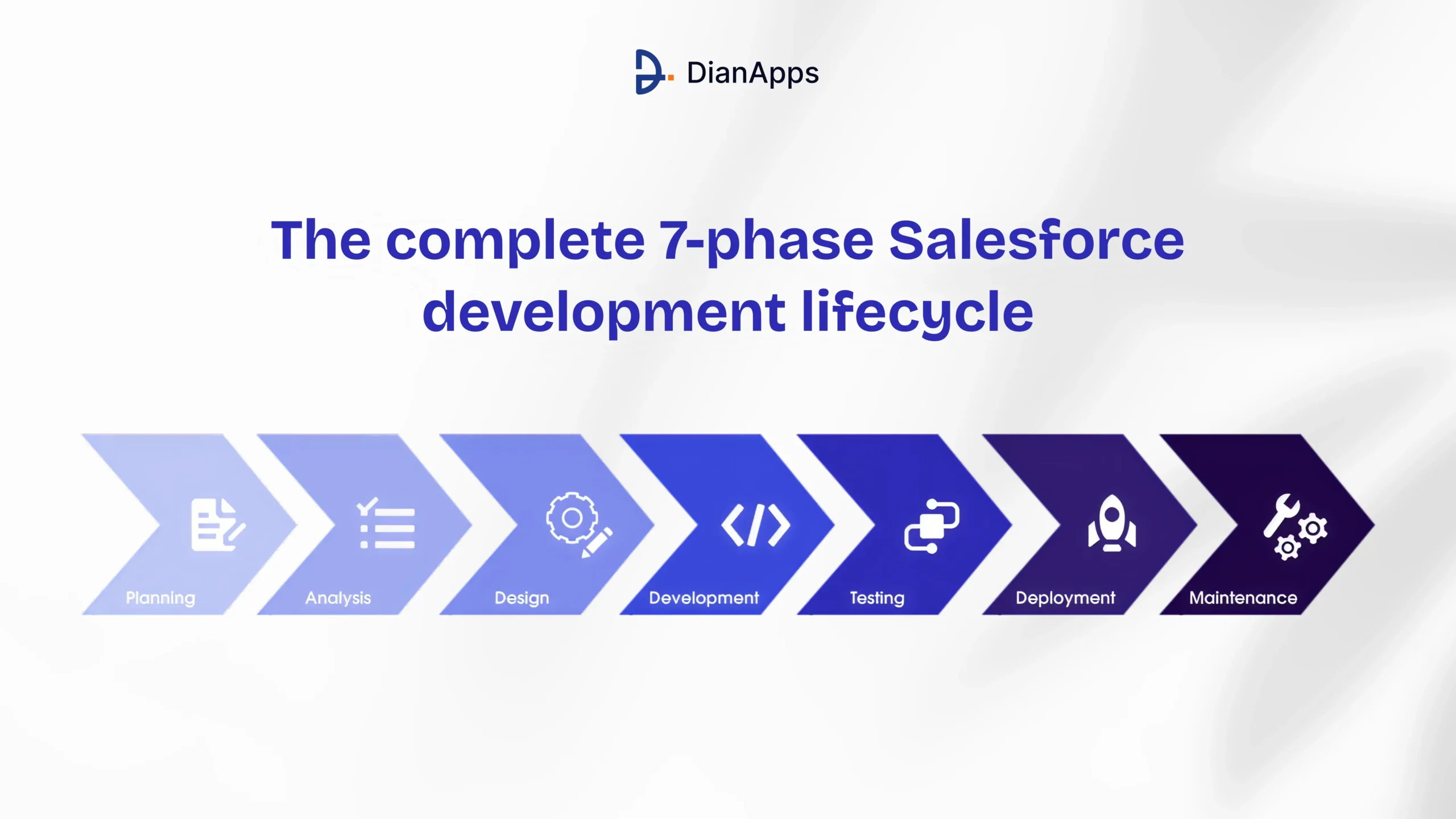





Quick Summary: The Salesforce development lifecycle is a structured, seven-phase process that guides teams from initial planning through continuous improvement. Each phase- Discovery, Design, Development, Testing, UAT, Deployment, and Maintenance- serves a specific purpose and helps teams avoid costly mistakes. Whether you are running an Agile sprint or a traditional release cycle, following this lifecycle is what separates a smooth Salesforce rollout from a chaotic one. At DianApps, our certified Salesforce developers follow this exact framework to deliver scalable, production-ready solutions on time.
Here is something most Salesforce project managers do not say out loud: a significant share of Salesforce implementations underperform not because the platform is limiting, but because the development process was not structured properly from day one.
That is a problem worth solving.
Salesforce is the world’s leading CRM, powering the sales, service, and marketing operations of over 150,000 businesses globally. It is flexible, endlessly customizable, and genuinely powerful. But that flexibility is a double-edged sword. Without a clear development lifecycle, even a talented Salesforce development company ends up with messy org structures, broken deployments, and technical debt that compounds over time.
So what does a well-run Salesforce project actually look like? It follows a lifecycle. A defined set of phases that every feature, fix, or new product passes through before it touches production.
This blog covers the complete 7-phase Salesforce development lifecycle, what each phase involves, why it matters, and how to execute it well. Whether you are a solo developer, a growing team, or an enterprise managing complex multi-cloud implementations, this is the roadmap you need.
What Are the Different Salesforce Development Phases?
The Salesforce development lifecycle is divided into distinct phases, with each phase serving a different purpose. Discovery defines what needs to be built, Design determines how it should work, Development turns the design into a working solution, Testing validates its quality, UAT confirms it meets business needs, Deployment moves it to production, and Maintenance keeps the solution reliable after launch.
| Phase | Primary Purpose | Key Activities |
|---|---|---|
| Discovery | Define the problem and requirements | Requirements gathering, scope, goals, integrations |
| Design | Create the technical blueprint | Data model, architecture, security, UI/UX |
| Development | Build the Salesforce solution | Apex, LWC, Flow, configuration, integrations |
| Testing | Validate functionality and quality | Unit, integration, regression, security testing |
| UAT | Validate business requirements | User testing, feedback, workflow validation |
| Deployment | Move changes to production | Validation, release planning, deployment, monitoring |
| Maintenance | Improve and support the solution | Bug fixes, optimization, release updates, enhancements |
These phases are not always strictly linear. In Agile Salesforce projects, teams may move between development, testing, and design multiple times within a sprint. Salesforce also describes development as an iterative process, with testing and feedback happening throughout the lifecycle.
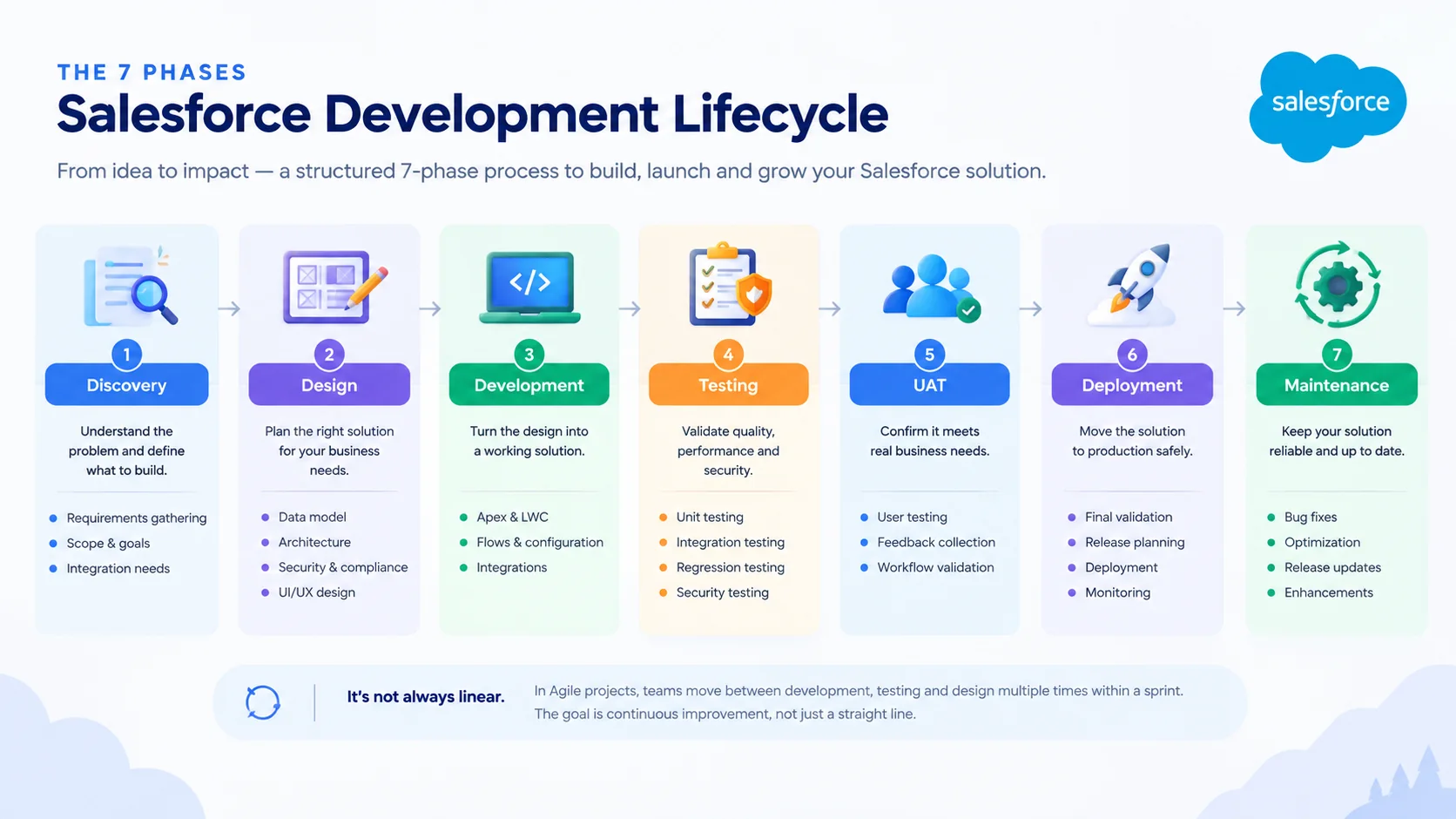
The key difference between the phases is therefore what decision or outcome each phase is responsible for.
Discovery answers: What should we build?
Design answers: How should we build it?
Development answers: Can we build it?
Testing and UAT answer: Does it work as expected?
Deployment answers: Can we release it safely?
Maintenance answers: How do we keep improving it?
What is a Salesforce Development Lifecycle?
The Salesforce Development Lifecycle (SDLC) is a structured process for planning, designing, developing, testing, deploying, and maintaining Salesforce solutions. A typical Salesforce lifecycle includes Discovery, Design, Development, Testing, User Acceptance Testing, Deployment, and Maintenance. Depending on the project methodology, these phases can overlap and repeat across Agile sprints rather than following a strictly linear sequence.
Think of it this way: every time your team adds a new feature to your org, whether that is a custom Apex trigger, a new Lightning component, or a process flow change, that change needs to move safely from idea to production. The lifecycle is the journey that change takes.
Salesforce teams can structure the development lifecycle in different ways depending on their methodology and project requirements. For this guide, we use a practical seven-phase model: Discovery, Design, Development, Testing, UAT, Deployment, and Maintenance. For teams planning each release cycle around Salesforce’s seasonal updates, our Spring ’26 release guide for developers covers LWC updates, Apex Cursors, Agentforce Builder, and security migrations to track. In practice, most mature teams expand this into a richer seven-phase model that includes Discovery upfront and ongoing Maintenance at the end.
Why does this matter? Because Salesforce is a multi-tenant cloud platform. Changes to your org can have cascading effects. A trigger that works in isolation can break bulk data operations. A new field can conflict with a validation rule. A deployment without proper testing can bring down critical business workflows. The lifecycle gives you guardrails.
7 Phases of Salesforce Development Lifecycle
In this section, you will get to look at each phase in detail. This is not just theory; each section includes what actually happens on the ground, what tools your team uses, and what goes wrong when you skip it.
Phase 1: Discovery
Every successful Salesforce project begins before a single line of code is written. The discovery phase is where you figure out exactly what you are building and why.
During discovery, business analysts, product managers, and key stakeholders come together to align on goals. What problem are we solving? What does success look like? What are the technical constraints? What data, integrations, and automation does this project touch?
This phase typically produces a requirements document, a feature backlog, and a project scope. The more rigorously you do this, the fewer expensive surprises appear in later phases.
Key activities in the discovery phase include:
- Gathering and documenting business requirements from all relevant departments
- Identifying existing Salesforce configurations that the new build will interact with
- Defining reporting, automation, and integration needs
- Establishing project governance, who approves what, and when
- Confirming the sandbox strategy (Developer, Partial Copy, Full Sandbox)
Skipping discovery is probably the single most common reason Salesforce projects go over budget. Teams jump straight into building without fully understanding the problem, then spend twice as long rebuilding.
Phase 2: Design
With requirements in hand, the design phase translates business needs into a technical blueprint. This is where your architects and senior developers think through how to build the solution before anyone writes a single line of Apex.
Good design decisions at this stage prevent painful refactorings later. For example, choosing the right data model whether to use a custom object or extend a standard one has ripple effects across every other part of the org. Deciding upfront whether automation logic belongs in a Flow or in Apex affects maintainability for years.
Design deliverables typically include:
- Data model design (objects, fields, relationships)
- Process and automation architecture (which tools handle which logic)
- Integration architecture (how external systems connect to Salesforce)
- Security model design (profiles, permission sets, sharing rules, OWD settings)
- UI/UX wireframes for custom Lightning components or pages
At DianApps, our team of certified Salesforce architects uses this phase to create a detailed technical specification before development begins, significantly reducing rework and misalignment with business stakeholders.
Recommended Read: The role of Apex, Visualforce, and Lightning in Salesforce development
Phase 3: Development
Now the actual building happens. Developers work in sandboxes, isolated copies of the Salesforce environment that let them build and experiment without touching production.
Modern Salesforce development uses a combination of declarative tools (Flows, Process Builder, point-and-click configuration) and programmatic tools (Apex classes, Lightning Web Components, Visualforce). The guiding principle is always to use the simplest appropriate tool: declarative first, code second.
During development, good teams follow these practices:
- Writing bulkified Apex code that handles governor limits for large data volumes
- Following trigger framework best practices to avoid recursive execution
- Building reusable Lightning Web Components instead of monolithic pages
- Using version control (typically Git with Salesforce DX) to track every change
- Writing Apex test classes as they go, not as an afterthought
Recommended Read: How to Build Scalable Custom Apps on Salesforce Using Apex
One thing worth calling out: Salesforce DX (SFDX) has fundamentally changed how development teams work. With source-driven development, every piece of metadata lives in a Git repository, enabling proper branching, code review, and CI/CD pipelines. Teams still using change sets as their primary development workflow are leaving a lot of efficiency on the table.
Phase 4: Testing
Testing in Salesforce is not optional, and Salesforce enforces this point rather firmly: the platform requires at least 75% Apex code coverage before you can deploy to production. But coverage is a floor, not a ceiling. A well-run team writes tests that verify behavior, not just tests that inflate coverage numbers.
The testing phase covers several layers:
- Unit Testing: Individual Apex methods and classes are tested in isolation using mock data
- Integration Testing: How do different components interact to trigger the right flow? Does the API callout return expected data?
- Regression Testing: Ensuring existing functionality has not broken as a result of new changes
- Performance Testing: How does the solution behave with bulk data loads? Does it hit CPU limits?
- Security Testing: Are field-level security settings respected? Can unauthorized profiles see data they should not?
A common mistake is treating testing as a box to check before deployment rather than a phase that genuinely improves code quality. The teams that ship the fewest bugs are the ones that write tests that would actually catch bugs if the code were broken.
Recommended Read: How To Get Accurate Software Testing Cost Estimation?
Phase 5: User Acceptance Testing (UAT)
UAT is where the real business validation happens. A small group of actual end users, not developers, not QA engineers, works through the new functionality in a staging environment to confirm that what was built matches what was asked for.
This phase often reveals a category of issues that technical testing simply cannot catch: the gap between what was specified and what users actually need. Maybe the workflow saves correctly, but the layout is confusing. Maybe the automation fires at the right time, but the notification email goes to the wrong person.
UAT typically involves:
- Creating real-world test scripts based on common user journeys
- Running sessions with representative users from each affected team
- Documenting feedback and triaging issues by severity
- Making final adjustments before the deployment green light
One of the most valuable outcomes of UAT is the buy-in it creates. When users feel like they are part of the process, adoption rates go up. When they feel like something was done to them, resistance follows.
Phase 6: Deployment
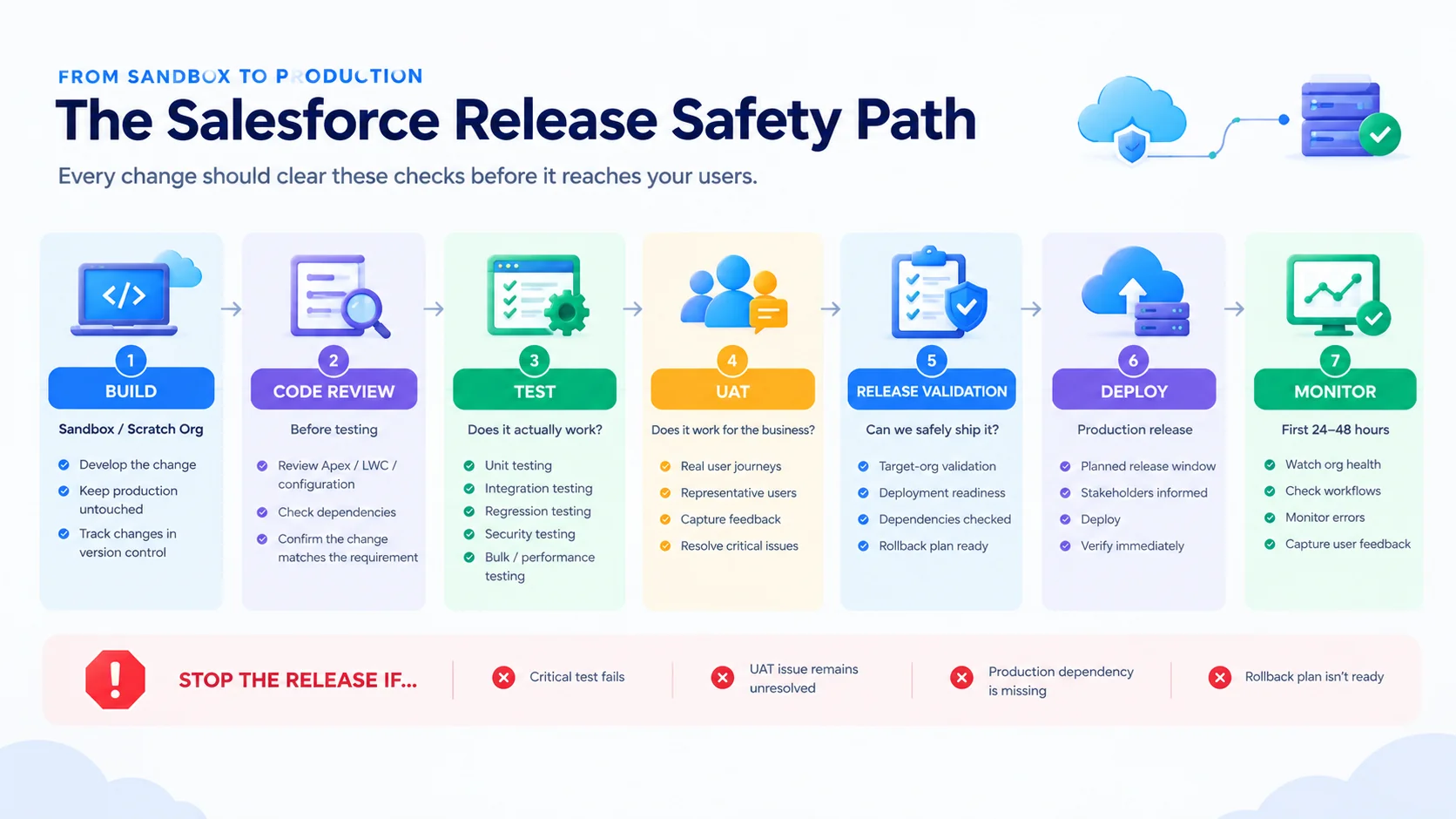
This is where your changes go live. Deployment in Salesforce can happen through several mechanisms, depending on your team’s maturity and tooling: Change Sets, the Metadata API, Salesforce CLI, or third-party DevOps tools like Copado, Gearset, or AutoRABIT.
A good deployment process includes:
- Selecting the right deployment window (ideally off-peak hours)
- Creating a detailed deployment runbook with rollback procedures
- Running all test classes in the target org during deployment
- Having a stakeholder communication plan ready for go-live
- Monitoring the org closely for the first 24-48 hours post-deployment
Deployment failures often trace back to environment-specific configuration differences, a custom setting that exists in your sandbox but not production, a named credential that was not migrated, or a hard-coded org ID in a formula field. Environment documentation is your best defense here.
Teams using Salesforce DevOps Center or dedicated CI/CD pipelines have a significant advantage: automated validation, environment comparisons, and audit trails that make deployments dramatically less stressful.
Phase 7: Maintenance & Continuous Improvement
Deployment is not the finish line. It is the starting gun for Phase 7.
Salesforce releases three major platform updates per year (Spring, Summer, Winter). Each release can introduce new features, deprecate old APIs, or change platform behavior in ways that affect your custom code. Staying current requires active monitoring.
Maintenance activities include:
Reviewing Salesforce release notes before each major update and testing in a sandbox
- Monitoring org health metrics: storage usage, API call volumes, code coverage trends
- Responding to user feedback and bug reports through a structured support process
- Refactoring legacy code and declarative automation as best practices evolve
- Planning the next release cycle based on new business requirements
The maintenance phase is also where the insights from production use inform the next discovery phase, completing the cycle. High-performing Salesforce teams treat their org as a living product, not a project that ends at go-live.
What Tools Are Used to Manage the Salesforce Development Lifecycle?
Managing the Salesforce development lifecycle typically requires a combination of development environments, version control, testing, deployment, and CI/CD tools. The right stack depends on team size, release complexity, governance requirements, and how much automation the team needs.
| Tool | Primary Use |
|---|---|
| Salesforce CLI | Development, metadata management, deployment, and automation |
| VS Code + Salesforce Extensions | Local Salesforce development and source-driven workflows |
| Git | Version control, branching, code review, and collaboration |
| Sandboxes / Scratch Orgs | Isolated development and testing environments |
| DevOps Center | Managing work items, pipelines, and Salesforce releases |
| Gearset | Salesforce deployment automation and DevOps |
| Copado | CI/CD, release management, and deployment governance |
| AutoRABIT | Salesforce DevOps, testing, and release automation |
| Flosum | Salesforce release management and DevOps |
Salesforce’s current developer tooling includes Salesforce CLI, VS Code extensions, development environments such as sandboxes and scratch orgs, DevOps Center, and CI/CD workflows. Third-party platforms such as Gearset, Copado, Flosum, and AutoRABIT can extend deployment and release-management capabilities.
For smaller teams, a stack built around Salesforce CLI, VS Code, Git, sandboxes, and DevOps Center may be sufficient. Larger teams with complex release pipelines may add dedicated Salesforce DevOps and CI/CD platforms.
How Can You Optimize the Salesforce Development Process?
To optimize the Salesforce development process, start with clear requirements and architecture, then use source-driven development, version control, automated testing, and CI/CD to reduce manual work. Development should happen in isolated environments, with code reviews and automated validation before deployment. After release, monitor the org, review user feedback, and use those insights to improve the next development cycle.
List of the Best Salesforce Development Lifecycle Models
Not every project follows exactly the same methodology. The right model depends on team size, project complexity, and how frequently you need to release changes.
Waterfall Model
The traditional sequential approach in which each phase completes before the next begins. Works well for large, well-defined implementations where requirements are stable, and stakeholders are aligned upfront. Not ideal for projects with evolving requirements.
Agile / Scrum
The most widely adopted model for Salesforce development today. Work is broken into 2-4 week sprints, each delivering a shippable increment of functionality. The iterative nature means teams can respond quickly to changing business needs. Pairs well with Salesforce DX and CI/CD tooling.
Kanban
A flow-based model where work moves through defined stages continuously rather than in fixed sprints. Works especially well for Salesforce support and maintenance teams managing a steady stream of bugs and small enhancement requests.
Hybrid / Scaled Agile
Larger organizations often combine elements of Agile and Waterfall using structured waterfall planning for major initiatives while running Agile sprints for ongoing development. Frameworks like SAFe (Scaled Agile Framework) provide governance structures for enterprise Salesforce programs.
DevOps-Driven Lifecycle
The most modern approach is where development and operations are integrated through automation. CI/CD pipelines automatically build, test, and deploy changes when code is committed. Tools like Gearset, Copado, and AutoRABIT bring true DevOps practice to Salesforce. This model reduces deployment risk significantly and enables teams to ship smaller, safer changes more frequently.
Recommended Read: Gain access to Open-Source for Salesforce Developers!
Importance of Salesforce Development Lifecycle
Why go through all this effort? Because the alternative is worse.
Without a structured lifecycle, teams accumulate technical debt quickly. One developer’s hotfix overrides another’s feature. A change deployed to production without testing breaks a critical automation. Users lose trust in the system. IT teams spend more time firefighting than building.
Here is what a proper lifecycle delivers:
Reduced Deployment Risk
Every phase of the lifecycle is essentially a gate that catches problems before they reach production. By the time a change is deployed, it has been reviewed, tested, and validated by multiple people. The result is dramatically fewer production incidents.
Better Team Collaboration
When everyone understands which phase a project is in and what their role is in that phase, handoffs are cleaner. Developers know exactly what the designers specified. QA engineers have clear test cases. Stakeholders know when to provide feedback. The lifecycle creates shared language.
Faster Time-to-Value
This might seem counterintuitive: more process means faster delivery? Yes, actually. Teams that skip phases spend enormous amounts of time on rework. Proper planning, design, and testing eliminate the back-and-forth that consumes calendar time. Well-run Agile Salesforce teams consistently outperform rushed, unstructured ones in long-term delivery speed.
Compliance and Auditability
For organizations in regulated industries financial services, healthcare, education having documented, auditable processes around how Salesforce changes are approved, built, and deployed is not just good practice. It is often a regulatory requirement. The lifecycle provides that paper trail.
Scalability
As your Salesforce implementation grows more clouds, more integrations, more users the complexity grows with it. A lifecycle-driven approach scales gracefully. An ad-hoc approach does not.
Final Words
The Salesforce development lifecycle is not bureaucratic overhead. It is the framework that makes great Salesforce work possible.
The teams that deliver the most value from Salesforce are not necessarily the ones with the most talented Salesforce consulting company. They are the ones with the most disciplined process. Discovery keeps the team focused on the right problems. Design prevents expensive architectural mistakes. Testing catches bugs before users do. And maintenance ensures the org keeps pace with both business needs and platform evolution.
If your current Salesforce implementation feels like it is held together with duct tape, or if you are starting fresh and want to do it right the first time, the seven-phase lifecycle is your foundation.
At DianApps, we have spent years building and optimizing Salesforce solutions for clients across industries including healthcare, fintech, e-commerce, real estate, and more. Our certified Salesforce developers and consultants follow this exact lifecycle on every engagement, from initial discovery through post-go-live support. If you want to see what a structured, expert-led Salesforce development process looks like in practice, we would love to show you.
 0 comments










Leave a Comment
Your email address will not be published. Required fields are marked *