













 0 comments
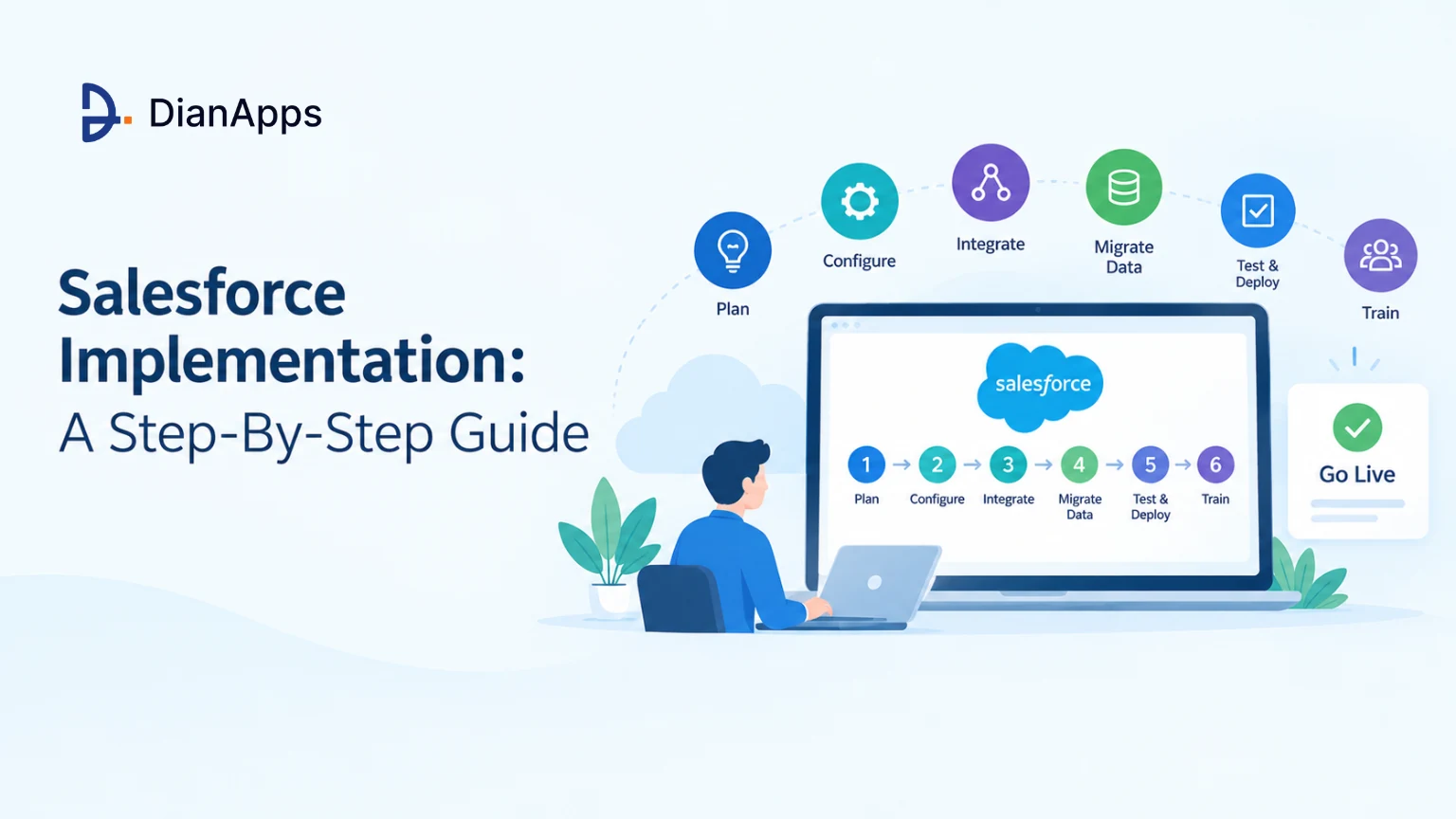





Salesforce has become an empowering customer relationship management (CRM) tool for every business, enabling them to connect and offer services to their customers via cloud-based software. However, Salesforce Implementation services can be complicated for people who are completely new to the concept.
With the right plan, though, most businesses can go live smoothly and see value quickly.
Salesforce has been the world’s #1 CRM vendor for 13 years in a row, with a 20% share of the CRM market in 2025, according to IDC. More than 150,000 companies use it.
If you are planning a Salesforce rollout, this guide covers the steps from planning to go-live, how long it takes, what it costs, the mistakes to avoid, and when to bring in an implementation partner.
Read on to find the step-by-step Salesforce Implementation guide.
What is Salesforce Implementation?
Salesforce implementation is the process of setting up Salesforce for your business so that sales, service, and marketing data and processes live in one CRM.
In practice, implementation means choosing the right Salesforce products and edition, configuring them around your processes, connecting your other systems, moving your existing data in, and getting your team to use it.
Why Should You Implement Salesforce?
Salesforce combines a wide range of native products like Sales, Service, and Marketing Cloud, catering to the demand of sales and marketing professionals. It also has AppExchange, Salesforce’s marketplace of thousands of third-party apps, so many needs can be met without custom development.
Due to Salesforce’s marketability, there is no lack of professionalism. The experts are always ready to help in customizing and implementing solutions as per your specific needs. So, if you are a complete newbie in the CRM landscape or not a tech-savvy, our best suggestion would be to delegate these tasks to experienced Salesforce implementation consultants who bring in-depth knowledge of the said platform.
Step-by-Step Guide to Salesforce Implementation

Salesforce implementation can be a great investment for businesses across the globe. Therefore, the preparations mustn’t be taken lightly. Before you launch your project, start with the below-mentioned steps:
Step 1: Workshop
The very first step is to schedule a meeting with your stakeholders to discuss the main agenda and challenges and to have a complete picture of your business needs for Salesforce implementation.
Implementation is not a one-and-done project. It involves time and therefore must be bifurcated into smaller activities.
Above everything, you need to ensure all the possible risks and know what to target before taking any charges. Here are a few considerations that you can abide by at the Salesforce implementation ideation stage:
- Choose the right products (Sales, Service, Marketing) and edition for your needs and budget. Since September 2026, new customers choose from Starter Suite, Pro Suite, Core, Advanced, and Max.
- Analyzing the potential dangers that may arise.
- Checking your data volume against Salesforce’s data and file storage allowances.
- Calculating the time invested while implementing the new system.
Step 2: Configuration & Customization
Salesforce customization and configuration are frequently confused and used synonymously. Configuration means using Salesforce’s point-and-click tools: objects and fields, page layouts, security settings, and automation built in Flow. Customization means writing code, such as Apex and Lightning Web Components, when configuration can’t do the job.
Start with configuration and use code only where you have to; it is cheaper to maintain. Build all automation in Flow, because Salesforce ended support for Workflow Rules and Process Builder on December 31, 2025. Do all of this work in a sandbox, not in your live org, and involve end users early.
Step 3: Integrations
Data must be centralized or, at the very least, move easily across systems. For instance, if your company is an online retailer, you should combine your CRM with order management programs. To call clients, ERP systems, etc., you might interface with calling or VOIP solutions. Map which data needs to flow between systems, in which direction, and how often. Then choose the method: Salesforce’s REST, SOAP, or Bulk APIs; Apex callouts; middleware such as MuleSoft; or a ready-made connector from AppExchange. Finally, be careful to run tests to verify that the system operates as planned.
Step 4: Data Migration
Every organization may already be utilizing a system, or at the absolute least an Excel sheet, to manage customer and account information before they begin using CRM. Clean the data before you move it: remove duplicates, fix missing fields, and agree which system is the source of truth. Use the Data Import Wizard for simple loads and Data Loader for large volumes. Run a trial migration in a sandbox first, then plan a cutover window when the old system is frozen, so no records are lost.
Step 5: Testing & Deployment
Test everything in a sandbox before go-live: automation, integrations, data, and security. Run user acceptance testing (UAT) with real users and real scenarios. Then move your changes to production with DevOps Center, change sets, or a CI/CD tool, so every change is tracked and can be rolled back.
Step 6: Salesforce Training
Any Salesforce project’s success depends on user acceptance. Train end users on the screens and processes they will actually use, and use Trailhead, Salesforce’s free learning platform, for the basics. The team may be terrified by the new system and the procedures that go along with it, but this training will reassure them and make sure they use the technology effectively. Expect a short productivity dip in the first weeks; good training keeps it small. Additionally, Salesforce may be implemented gradually to prevent resistance from the workforce.
Step 7: Support
It’s essential to remain accessible to the client in case any difficulties or troubleshooting is needed once Salesforce has gone live. Once a user begins to utilize the instrument to its greatest extent, there may be ‘n’ inquiries for them.
Know that we have covered all the vital steps that help companies skyrocket their Salesforce implementation process; let’s move on to the best practices that you can make use of.
After go-live, plan for ongoing administration: Salesforce ships three releases a year (Spring, Summer, and Winter), and each one can change features you rely on.
How Long Does Salesforce Implementation Take, and What Does It Cost?
Every project is different, but industry estimates for 2026 fall into three rough bands (one-time implementation cost, excluding licenses):
- Small business, one cloud, light customization: about 4 to 8 weeks, $10,000 to $30,000
- Mid-market, several teams or clouds, some integrations: about 3 to 6 months, $50,000 to $150,000
- Enterprise, multiple clouds, business units and integrations: 6 to 12 months or more, $150,000 to $500,000 or more
Licenses are a separate, recurring cost. Sales and Service Cloud list prices run from $25 per user per month (Starter Suite) to $100 (Pro Suite), $195 (Core), $395 (Advanced), and $550 (Max), billed annually.
The biggest cost drivers are the number of integrations, the amount and quality of data to migrate, custom code, and how fast you need to go live. Costs people often forget: AppExchange app subscriptions, sandboxes, ongoing admin support, and training.
Best Salesforce Implementation Practices
- The executive team strongly affects user adoption. The other employees will use the new technology more effectively if the management team makes a push about its significance, worth, and effort.
- Every company will already have business processes in place. Implementing tools like CRM software development should be done in a way that makes the work of the sales staff simple.
- It’s essential to migrate outdated data and integrate it with technologies that have data. Poor data may cause users to reject the tool or lead to mistakes in corporate procedures.
- Salesforce should be implemented so that it is simple for end users to use, including smooth data movement inside and across pages, ease of search and navigation, etc.
- Salesforce features should be developed such that they continue to function flawlessly as your company’s user base and level of complexity grow.
- Your daily activities should not rise but rather decrease as a result of Salesforce. This is where Flow automation and approval processes help.
- The management team starts to depend on reports and dashboards. It must be exact, accurate, and significant.
Every team, including yours, should keep these suggestions in mind as they adopt Salesforce.
Common Mistakes in Salesforce Projects
Salesforce implementation is not simple. It could also become worse. The end users may not utilize the product at all after devoting so many hours to the project. To help you avoid them, we’ll go through a few typical errors in this section. You can stop them right now.
- Planning out the entire project is essential. If a schedule or list of modifications isn’t established, you risk doing the same activity repeatedly or incorrectly.
- Failed Salesforce initiatives frequently have data problems. Business efficiency is frequently impacted by duplicate data and inaccurate or missing information.
- At the very beginning of the project, it is important to establish the roles of the stakeholders and the project manager. If this is not done as soon as possible, people start to play blame games without taking responsibility.
- Cloud software is frequently promoted as being user-friendly. However, occasionally the DIY procedures might go wrong and ruin the entire production. If necessary, seek professional guidance as soon as possible.
- Setting an improbable budget and milestone deadlines might result in project failure or Salesforce implementation that falls short of its full potential.
Salesforce Implementation Partners
During the implementation process, a common question may come up about whether to hire a Salesforce development company. Or should you do it yourself?
Budget restrictions may be a problem for many small and medium-sized organizations; thus, they would rather handle setups themselves. On the other hand, having a partner or specialist handle the configuration and assistance is always a smart idea.
You must identify the objectives and operational procedures that work best for your organization. A partner might assist and offer advice on how to effectively integrate this procedure with the Salesforce technology. Their knowledge becomes useful at that point.
Consider hiring a Salesforce consulting partner if your company is expanding and has many departments that will utilize Salesforce.
When you compare partners, check their Salesforce partner tier. Since 2026, consulting partners are ranked Select or Summit. Also check the certifications of the people who will work on your project.
Final Thoughts
A successful Salesforce launch depends far more on planning, clean data, and user adoption than on the software itself. Due to the ongoing nature of Salesforce integration with your regular business operations, it is essential to divide the process into smaller phases.
It is advisable to roll out Salesforce gradually so that your employees have time to become used to it.
All participants should be updated often on the implementation’s progress. Even if it is too early to involve a significant number of participants, employees will feel more invested in the process if they are informed of progress.
We anticipate that this article will help you gain a deeper grasp of the Salesforce setup procedure and will help you achieve your goals. For any queries, hire Salesforce consultants to achieve better results and understanding.
 0 comments









Your email address will not be published. Required fields are marked *