















 0 comments





Quick Overview:
This guide covers all major Salesforce Spring ’26 developer updates, from LWC template expressions and Apex Cursors to Agentforce Builder, mandatory security migrations, Flow logging, GraphQL mutations, and more.
- Complex Template Expressions in LWC (Beta), write JS inline in templates
- Apex Cursors are now Generally Available, process up to 50M records
- Agentforce Builder with Canvas + Script views for AI agent development
- RunRelevantTests for faster, dependency-aware deployments (API v66)
- Agent Script, YAML-like DSL for deterministic agent behavior
- TypeScript support for LWC via @salesforce/lightning-types
- External Client Apps replacing Connected Apps (mandatory migration)
- Flow Logging, Kanban boards, and inline-editable data tables
- Triple DES retirement deadline, Summer ’26 (urgent action required)
- GraphQL mutations are now supported in API v66
Why Spring ’26 Is a Milestone Release for Developers
Every Salesforce release matters.
But the Salesforce Spring ’26 update feels different. This isn’t just a collection of quality-of-life improvements; it’s a definitive shift in how the platform thinks about the developer experience, AI integration, and long-term architectural strategy.
As one Salesforce Developer Advocate noted, Spring ’26 is “a gobstopper of a release for developers”, packed with GA features that remove years-old friction points, Beta features that preview the agentic future, and mandatory security changes that demand immediate attention.
The defining theme of this release is the move toward what Salesforce calls the “Agentic Enterprise”, a model where AI agents and human developers co-build, co-test, and co-deploy across every layer of the platform.
If you’ve been watching Agentforce evolve since its introduction, Spring ’26 is where it starts to feel like native infrastructure rather than a bolted-on product.
In this guide, we’ll break down every developer-relevant feature across LWC, Apex, Agentforce 360 platform, Flow, APIs, and security, so you can prioritize what to test first, what to plan for, and what to act on immediately.
Whether you’re a solo Salesforce developer, part of an enterprise team, or partnering with a specialist provider of Salesforce development services, this guide has you covered.
Pro Tip: Sandbox preview for Spring ’26 began January 9, 2026. If you haven’t yet spun up a pre-release org, do it now; some Beta features require explicit activation in Setup before they appear.
Release Dates & Rollout Timeline
The Spring ’26 release follows Salesforce’s standard phased rollout. Here’s the definitive timeline every developer should have bookmarked:
| Date | Milestone | Details |
|---|---|---|
| Dec 18, 2025 | Pre-Release Dev Edition | Sign up for the standalone Developer Edition with all Spring '26 features. |
| Jan 9–10, 2026 | Sandbox Preview Begins | Early access in sandboxes for safe exploration and validation. |
| Jan 16, 2026 | Production Wave 1 | Initial production instances upgraded. Check Salesforce Trust for your org. |
| Feb 13, 2026 | Production Wave 2 | The majority of production orgs upgraded in this wave. |
| Feb 20, 2026 | Production Wave 3 (Final) | All remaining production environments upgraded. Spring '26 will be fully live globally. |
Important: Several Spring ’26 changes are enforced, not opt-in. Review the security migration section carefully. The Connected Apps retirement and Triple DES deprecation have hard deadlines with real consequences.
Mandatory Changes: Action Required Now
Session IDs in outbound messages removed Feb 16, 2026. New Connected Apps are disabled by default. Triple DES SAML retires Summer ’26. Full details in Section 9.
Lightning Web Components (LWC) Updates in Spring’26
Spring ’26 delivers a strong batch of LWC improvements, a new dynamic event listener directive, complete GraphQL CRUD support, a completed TypeScript rollout, a cleaner way to launch flows, and a long-overdue developer debugging tool
1. Dynamic Event Listeners.
Before Spring ’26, every event handler had to be declared statically in your HTML template. If you wanted to swap behavior at runtime, you needed messy conditional rendering or manual addEventListener calls.
The new LWC: on directive solves this cleanly. You pass a plain JavaScript object where each key is an event name, and each value is the handler function. LWC automatically rewires the listeners whenever the object reference changes, no template edits required.
- How it works: Object keys are event names (click, mouseenter…). Values are the functions that run when that event fires.
- The benefit: Swap an entire set of event behaviors at runtime from JavaScript alone, without ever touching the HTML template.
|
1 2 3 4 5 6 7 8 9 10 11 12 13 14 15 16 17 18 19 20 21 22 23 24 |
<template> <div class="slds-card slds-p-around_medium"> <!-- lwc:on accepts a plain JS object. Keys = event names, values = handler functions. LWC rewires listeners when the object reference changes. --> <div class="interactive-box" lwc:on={boxEventHandlers}> <span>{message}</span> <span>{hint}</span> </div> <lightning-radio-group name="mode" label="Interaction Mode" options={modeOptions} value={currentMode} type="button" onchange={handleModeChange}> </lightning-radio-group> </div> </template> |
,
|
1 2 3 4 5 6 7 8 9 10 11 12 13 14 15 16 17 18 19 20 21 22 23 24 25 26 27 28 29 30 31 32 33 34 35 36 37 38 39 |
import { LightningElement, track } from 'lwc'; export default class DynamicEventListener extends LightningElement { @track currentMode = 'click'; @track message = 'Interact with the box!'; modeOptions = [ { label: 'Click Mode', value: 'click' }, { label: 'Hover Mode', value: 'hover' }, ]; // Returning a different object causes LWC to swap event listeners. get boxEventHandlers() { switch (this.currentMode) { case 'click': return { click: this.handleClick }; case 'hover': return { mouseenter: this.handleMouseEnter, mouseleave: this.handleMouseLeave, }; default: return {}; } } get hint() { return this.currentMode === 'click' ? '👆 Click here' : '🖐️ Hover here'; } handleClick = () => { this.message = '🖱️ You clicked!'; }; handleMouseEnter = () => { this.message = '✨ Mouse entered!'; }; handleMouseLeave = () => { this.message = '👋 Mouse left!'; }; handleModeChange(event) { this.currentMode = event.detail.value; this.message = 'Switched to ' + this.currentMode + ' mode'; } } |
Key insight
The getter returns a completely new object whenever the current mode changes. LWC’s reactivity system detects the new reference and smoothly updates which events the element listens to, no removeEventListener calls, no if-blocks in the template. Source: LWC Recipes PR #1081.
2. GraphQL Mutations in LWC
Spring ’26 completes GraphQL CRUD in LWC. The existing @wire(graphql) adapter handles reactive reads. The new executeMutation method provides an imperative API for creating, updating, and deleting data; use it anywhere you need to write data from JavaScript.
Define your mutation once using the gql template literal, then call executeMutation with the query and variables. The response returns exactly the fields you requested.
graphqlMutationCreate.js
|
1 2 3 4 5 6 7 8 9 10 11 12 13 14 15 16 17 18 19 20 21 22 23 24 25 26 27 28 29 30 31 32 33 34 35 36 37 38 39 40 41 42 43 44 45 46 47 |
import { LightningElement } from 'lwc'; import { gql, executeMutation } from 'lightning/graphql'; // Define the mutation once at the module level const CREATE_ACCOUNT = gql` mutation CreateAccount($input: AccountCreateInput!) { uiapi { AccountCreate(input: $input) { Record { Id Name { value } Type { value } } } } } `; export default class GraphqlMutationCreate extends LightningElement { isLoading = false; createdId = ''; errorMsg = ''; async createAccount(name, type) { this.isLoading = true; try { // Note: returns { data, errors }, errors is an ARRAY const { data, errors } = await executeMutation(this, { query: CREATE_ACCOUNT, variables: { input: { Name: { value: name }, Type: { value: type }, } }, operationName: 'CreateAccount', }); if (errors?.length) { this.errorMsg = errors.map(e => e.message).join(', '); return; } this.createdId = data?.uiapi?.AccountCreate?.Record?.Id; } finally { this.isLoading = false; } } } |
graphqlMutationUpdate.js
|
1 2 3 4 5 6 7 8 9 10 11 12 13 14 15 16 17 18 19 20 21 22 23 24 25 26 27 28 29 |
import { gql, executeMutation } from 'lightning/graphql'; const UPDATE_CONTACT = gql` mutation UpdateContact($id: ID!, $input: ContactUpdateInput!) { uiapi { ContactUpdate(id: $id, input: $input) { Record { Id FirstName { value } LastName { value } Email { value } } } } } `; async updateContact(recordId, firstName, lastName, email) { const { data, errors } = await executeMutation(this, { query: UPDATE_CONTACT, variables: { id: recordId, input: { FirstName: { value: firstName }, LastName: { value: lastName }, Email: { value: email }, } }, operationName: 'UpdateContact', }); if (!errors?.length) { console.log('Updated:', data?.uiapi?.ContactUpdate?.Record?.Id); } } |
graphqlMutationDelete.js
|
1 2 3 4 5 6 7 8 9 10 11 12 13 14 15 16 17 18 19 20 21 22 |
import { LightningElement, wire } from 'lwc'; import { gql, executeMutation, refreshGraphQL } from 'lightning/graphql'; const DELETE_CONTACT = gql` mutation DeleteContact($id: ID!) { uiapi { ContactDelete(id: $id) { Record { Id } } } } `; async deleteContact(recordId) { const { errors } = await executeMutation(this, { query: DELETE_CONTACT, variables: { id: recordId }, operationName: 'DeleteContact', }); if (!errors?.length) { // Refresh the @wire read query to reflect the deletion await refreshGraphQL(this.contactsWireResult); } } |
errors (array) – not error (singular)
executeMutation returns { data, errors } where errors is an array. Always check errors?.length. Child relationship fields are not supported in mutation response queries. See LWC Recipes PR #1083 for complete implementation with tests.
3. TypeScript Support for Base Components
The TypeScript rollout for Lightning base components is now complete. Install @salesforce/lightning-types to get IntelliSense, autocomplete, and compile-time error detection for every base component. Catch bugs at edit time, not after deployment.
Set up in 4 steps:
- Step 1: Install: npm install –save-dev typescript @salesforce/lightning-types
- Step 2: Enable: Add “salesforcedx-vscode-lwc.typescript”: true to .vscode/settings.json
- Step 3: Compile: npx tsc –project ./force-app/main/default/lwc
- Step 4: Deploy: sf project deploy start –source-dir force-app
typeSafeForm.ts
|
1 2 3 4 5 6 7 8 9 10 11 12 13 14 15 16 17 18 19 20 21 22 23 24 25 26 27 28 29 30 31 32 33 34 35 |
import { LightningElement } from 'lwc'; import type { LightningInput, LightningButton, LightningCombobox, } from '@salesforce/lightning-types'; export default class TypeSafeForm extends LightningElement { firstName: string = ''; lastName: string = ''; status: string = ''; // Cast event.target for full IntelliSense on .value, .validity, .label handleFirstNameChange(event: Event): void { const input = event.target as LightningInput; if (input.validity.valid) { this.firstName = input.value; } } handleLastNameChange(event: Event): void { const input = event.target as LightningInput; this.lastName = input.value; } handleSubmit(event: Event): void { const btn = event.target as LightningButton; console.log('Button label:', btn.label); // fully typed, no 'any' } handleStatusChange(event: Event): void { const combo = event.target as LightningCombobox; this.status = combo.value; } } |
Pro tip
The platform stores only JavaScript .ts files that are compiled locally, and the .js output is deployed. Never ship uncompiled TypeScript to a package. If you have custom type stubs for base components, switch to @salesforce/lightning-types for better coverage.
4. Navigate to Flows from LWC
Launching a flow from a component now takes one navigate call. Use the standard__flow PageReference type with the flow’s API name, and pass input data through the state object, it maps directly to the flow’s input variables.
navToFlow.js, LWC Recipes PR #1082
|
1 2 3 4 5 6 7 8 9 10 11 12 13 14 15 16 17 18 19 20 21 |
import { LightningElement, api } from 'lwc'; import { NavigationMixin } from 'lightning/navigation'; export default class NavToFlow extends NavigationMixin(LightningElement) { @api recordId; @api flowApiName = 'Contact_Onboarding_Flow'; handleLaunchFlow() { this[NavigationMixin.Navigate]({ type: 'standard__flow', attributes: { flowApiName: this.flowApiName, }, state: { // state keys prefixed with flow__ become flow input variables 'flow__contactId': this.recordId, 'flow__source': 'LWC', } }); } } |
5. Error Console
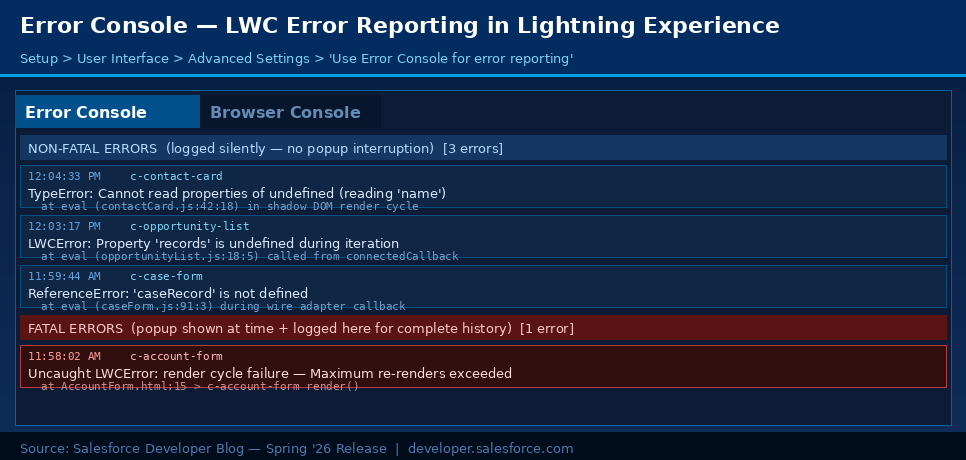
Tired of red-box popups interrupting your testing? The Error Console silently logs non-fatal errors to a dedicated panel you can review whenever you want. Fatal errors that do require a pop-up are also captured here for a full debug history.
Enable it at: Setup > User Interface > Advanced Settings > ‘Use Error Console for error reporting in Lightning Experience’.
6. Complex Template Expressions
Write JavaScript expressions directly in LWC templates, template literals, ternary operators, optional chaining, null coalescing, array methods, and inline event handlers. No more boilerplate getter methods for simple display logic.
Before Spring ’26
|
1 2 3 4 5 6 7 8 9 10 11 |
<!-- BEFORE, getter methods required for all display logic --> // contactCard.js get fullName() { return `${this.firstName} ${this.lastName}`; } get statusLabel() { return this.isActive ? 'Active' : 'Inactive'; } get stockCount() { return this.items.filter(i => i.inStock).length; } // contactCard.html <p>{fullName}</p> <span>{statusLabel}</span> <p>{stockCount} in stock</p> |
After Spring ’26 Complex Template Expressions
|
1 2 3 4 5 6 7 8 9 10 11 12 13 14 15 16 |
<!-- AFTER, inline expressions, no getters needed --> <!-- Template literal --> <p>{`Hello, ${firstName} ${lastName}!`}</p> <!-- Ternary --> <span>{isActive ? 'Active' : 'Inactive'}</span> <!-- Array method --> <p>{items.filter(item => item.inStock).length} in stock</p> <!-- Optional chaining + null coalescing --> <p>Theme: {user?.profile?.theme ?? 'default'}</p> <!-- Inline handler --> <lightning-button label="Add" onclick={()=>{ quantity++ }}></lightning-button> |
Beta: use in the sandbox first
Complex Template Expressions are subject to Salesforce Beta Services Terms. The feature direction is committed, but the syntax may change before GA. Test in sandbox and developer orgs before any production rollout.
7. Lightning Empty State & Illustration Component
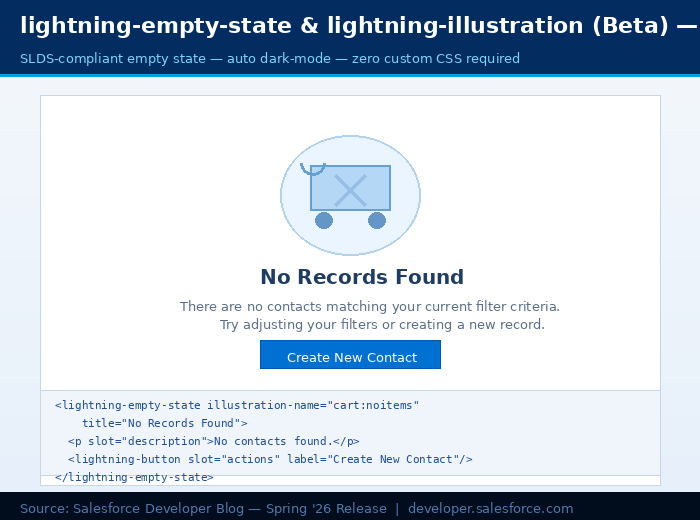
Two new base components deliver SLDS-compliant empty states with zero custom CSS. Both automatically adapt to dark mode themes. Drop them in, and they look polished immediately.
|
1 2 3 4 5 6 7 8 9 10 11 12 13 14 15 16 17 18 19 20 21 22 23 |
<!-- Full empty state with illustration, title, description, and CTA --> <lightning-empty-state illustration-name="cart:noitems" title="No Records Found"> <p slot="description"> No contacts match your current filters. </p> <lightning-button slot="actions" label="Create New Contact" onclick={handleCreate}> </lightning-button> </lightning-empty-state> <!-- Illustration only, no surrounding text needed --> <lightning-illustration illustration-name="access:request" size="large"> </lightning-illustration> <!-- Available names: cart:noitems, access:request, empty:desert, error:pageNotFound, and more from the SLDS illustration library --> |
Apex Updates in Spring ’26
Apex gets three meaningful improvements this release: Cursors move to GA for large-dataset processing, RunRelevantTests speeds up CI/CD deployments, and a new ConnectApi method eliminates callouts for picklist data.
1. Apex Cursors: Now Generally Available
Apex Cursors let you work with large SOQL result sets in manageable chunks without the rigidity of Batch Apex. Create a cursor once, the result set is cached server-side, then fetch records from any position, forward or backward. Ideal for processing millions of records without re-running the query.
Basic usage
|
1 2 3 4 5 6 7 8 9 10 11 12 13 |
Database.Cursor locator = Database.getCursor( 'SELECT Id, Name, Status__c FROM Case WHERE Status__c = \'Open\' ORDER BY CreatedDate' ); Integer total = locator.getNumRecords(); // Fetch any chunk from any offset, bidirectional List<Case> first = locator.fetch(0, 200); List<Case> second = locator.fetch(200, 200); List<Case> last = locator.fetch(total - 50, 50); // Track governor limit usage System.debug('Cursor rows used: ' + Limits.getApexCursorRows()); |
Pattern 1: Queueable chaining for millions of records
Cursors are serialisable; they survive intact between Queueable job executions, so you can chain through arbitrarily large datasets without ever re-running the query.
QueryChunkingQueueable.cls
|
1 2 3 4 5 6 7 8 9 10 11 12 13 14 15 16 17 18 19 20 21 22 23 24 25 26 27 28 29 30 31 32 33 34 35 |
public class QueryChunkingQueueable implements Queueable { private Database.Cursor locator; private Integer position; // Entry point, create the cursor once, it is cached server-side public QueryChunkingQueueable() { this.locator = Database.getCursor( 'SELECT Id FROM Contact WHERE LastActivityDate = LAST_N_DAYS:400' ); this.position = 0; } public void execute(QueueableContext ctx) { // Chunk size is flexible, Batch Apex fixes it at job start List<Contact> scope = locator.fetch(position, 200); position += scope.size(); List<Contact> toUpdate = new List<Contact>(); for (Contact c : scope) { c.Description = 'Archived: ' + Date.today(); toUpdate.add(c); } if (!toUpdate.isEmpty()) update toUpdate; // Re-enqueue while records remain, chains automatically if (position < locator.getNumRecords()) { System.enqueueJob(this); } } public static void start() { System.enqueueJob(new QueryChunkingQueueable()); } } |
Pattern 2: PaginationCursor for LWC page navigation
PaginationCursor is a variant built for user-facing lists. It is @AuraEnabled-serialisable, pass it between your LWC and Apex for smooth server-side paging with no OFFSET queries.
PaginationController.cls
|
1 2 3 4 5 6 7 8 9 10 11 12 13 14 15 16 17 18 19 20 21 22 23 24 25 26 27 28 29 30 31 32 |
public with sharing class PaginationController { public class PageResult { @AuraEnabled public List<Contact> records; @AuraEnabled public Database.PaginationCursor cursor; @AuraEnabled public Integer total; @AuraEnabled public Boolean hasMore; } @AuraEnabled(cacheable=false) public static PageResult getFirstPage(Integer pageSize) { Database.PaginationCursor cursor = Database.getPaginationCursor( 'SELECT Id, FirstName, LastName, Email FROM Contact ORDER BY LastName' ); return build(cursor, pageSize); } // Reuse the cursor, no new SOQL issued on the server @AuraEnabled(cacheable=false) public static PageResult getNextPage(Database.PaginationCursor cursor, Integer pageSize) { return build(cursor, pageSize); } private static PageResult build(Database.PaginationCursor cursor, Integer pageSize) { PageResult r = new PageResult(); r.records = cursor.fetchPage(pageSize); r.cursor = cursor; r.total = cursor.getNumRecords(); r.hasMore = cursor.getNumRecords() > 0; return r; } } |
paginatedList.js
|
1 2 3 4 5 6 7 8 9 10 11 12 13 14 15 16 17 18 19 20 21 22 23 24 25 26 27 28 |
import { LightningElement, track } from 'lwc'; import getFirstPage from '@salesforce/apex/PaginationController.getFirstPage'; import getNextPage from '@salesforce/apex/PaginationController.getNextPage'; const PAGE_SIZE = 20; export default class PaginatedList extends LightningElement { @track records = []; @track hasMore = false; cursor = null; total = 0; async connectedCallback() { const r = await getFirstPage({ pageSize: PAGE_SIZE }); this.records = r.records; this.cursor = r.cursor; // serialised cursor returned to Apex on next call this.total = r.total; this.hasMore = r.hasMore; } async loadNextPage() { if (!this.hasMore) return; const r = await getNextPage({ cursor: this.cursor, pageSize: PAGE_SIZE }); this.records = [...this.records, ...r.records]; this.cursor = r.cursor; this.hasMore = r.hasMore; } } |
Cursor vs Batch Apex vs PaginationCursor
| Dimension | Batch Apex | Cursor + Queueable | PaginationCursor |
|---|---|---|---|
| Max records | 50M | 50M per cursor | 100K per cursor |
| Query re-execution | Yes (per chunk) | No, server-cached | No, server-cached |
| Direction | Forward only | Bidirectional | Bidirectional |
| Chunk size | Fixed at job start | Flexible per fetch() | Fixed per fetchPage() |
| LWC pagination | Complex (polling) | @AuraEnabled serialisable | @AuraEnabled serialisable |
| Best for | Scheduled DML-heavy jobs | Async large-volume processing | User-facing list pagination |
Cursor governor limits
Cursors help you use limits smarter; they don’t bypass them. Each fetch() counts against the SOQL row limit. Max: 50M records/cursor, 10K cursor instances/24hrs, 200K PaginationCursor instances/24hrs.
2. RunRelevantTests: Faster Deployments
A new deployment test level that analyzes the dependency graph of your payload and runs only the tests relevant to the changed code. For large organizations with thousands of test methods, this can dramatically reduce CI/CD deployment time.
|
1 2 3 4 5 6 7 |
# Use RunRelevantTests, dependency analysis is automatic sf project deploy start --test-level RunRelevantTests # Scoped to a specific file sf project deploy start \ --source-dir force-app/main/default/classes/OrderService.cls \ --test-level RunRelevantTests |
|
1 2 3 4 5 6 7 8 9 10 11 12 13 |
// @IsTest(testFor), link a test to specific components. // Only runs when OrderService or OrderTrigger is in the deployment. @IsTest(testFor='ApexClass:OrderService,ApexTrigger:OrderTrigger') public class OrderServiceTest { @isTest static void testOrderCreation() { /* ... */ } } // @IsTest(critical=true), this test ALWAYS runs regardless of payload. // Use for smoke tests, compliance checks, cross-system integration tests. @IsTest(critical=true) public class CriticalSmokeTest { @isTest static void runAlways() { /* ... */ } } |
3. Picklist Values by Record Type: New Apex Method
Retrieving record-type-specific picklist values in Apex used to require UI API callouts. The new ConnectApi.RecordUi.getPicklistValuesByRecordType() method eliminates that; one native Apex call returns all picklist fields for a given record type, including dependent relationships and default values.
|
1 2 3 4 5 6 7 8 9 10 11 12 13 14 15 16 17 18 19 20 21 22 |
@AuraEnabled(cacheable=true) public static Map<String, Object> getPicklistValues( String objectApiName, String recordTypeId ) { ConnectApi.PicklistValuesCollection col = ConnectApi.RecordUi.getPicklistValuesByRecordType( objectApiName, recordTypeId ); Map<String, Object> result = new Map<String, Object>(); for (String field : col.picklistFieldValues.keySet()) { ConnectApi.PicklistValuesRepresentation pvr = col.picklistFieldValues.get(field); List<String> vals = new List<String>(); for (ConnectApi.PicklistValueRepresentation pv : pvr.values) { vals.add(pv.value); } result.put(field, vals); } return result; } |
4. Blob.toPdf(): New Rendering Engine
Blob.toPdf() now uses the same rendering engine as Visualforce PDFs, consistent output, expanded font support, and full CJK (Chinese, Japanese, Korean), Thai, and Arabic character rendering. The API is unchanged; the results are better.
|
1 2 3 4 5 6 7 8 9 10 11 12 13 14 15 16 17 18 19 20 21 22 |
public class CertificateGenerator { public static Blob generate(String recipient, String course, Date completed) { String html = '<!DOCTYPE html><html><head>' + '<meta charset="UTF-8">' + '<style>' + 'body { font-family: Arial, sans-serif; margin: 60px; }' // Backward compat: if your PDFs use old serif font, add: // font-family: serif; + '.cert { padding: 60px; border: 3px solid #032D60; }' + 'h1 { color: #032D60; text-align: center; }' + '.name { color: #00A1E0; font-size: 28px; text-align: center; }' + '</style></head><body><div class="cert">' + '<h1>Certificate of Completion</h1>' + '<p class="name">' + recipient + '</p>' + '<p style="text-align:center">Completed: ' + course + '</p>' // Spring '26 engine renders CJK / Arabic / Thai natively + '<p style="text-align:center">完了 · مكتمل · เสร็จ</p>' + '</div></body></html>'; return Blob.toPdf(html); // same API, upgraded engine under the hood } } |
Check existing PDFs before Summer ’26
If your PDFs rely on the old serif default font, line breaks and spacing may change. Add font-family: serif to maintain backward compatibility. Review via Setup > Release Updates and test in the sandbox before the Summer ’26 enforcement date.
Agentforce Developer Features
Spring ’26 brings the most significant Agentforce developer tooling update to date, a rebuilt Builder interface, a new DSL for authoring agent logic, a spreadsheet-style testing environment, and pro-code VS Code tooling. Updates ship monthly within the release window, so watch the release notes.
1. New Agentforce Builder: Canvas & Script Views
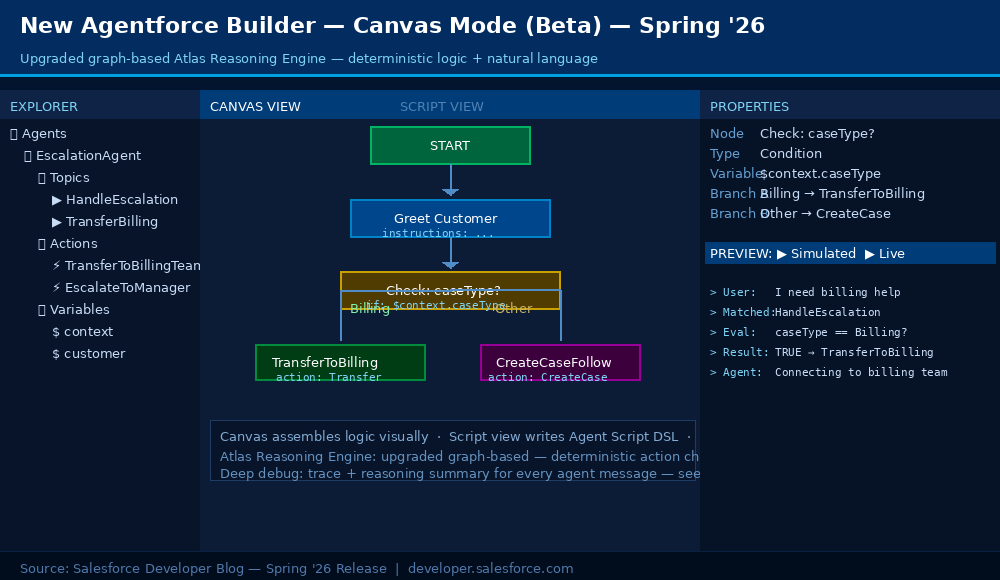
The new Agentforce Builder replaces the previous interface with a text editor-inspired IDE, complete with a file explorer, two distinct working modes, and an upgraded graph-based Atlas Reasoning Engine that lets you mix deterministic logic with natural language prompts.
- Canvas view: Drag-and-drop visual editor for assembling if-then logic flows, action sequences, and topic transitions.
- Script view: Author Agent Script DSL directly in a text editor, version-controllable and diffable.
- Deterministic logic: Chain actions in a guaranteed sequence. Control topic transitions precisely, without relying solely on LLM judgment.
- Deep debug: Trace + reasoning summary for every agent message. See exactly why the agent took each action.
2. Agent Script DSL
Agent Script is a new DSL that combines natural language instructions with deterministic code-like constructs, if-else conditions, variable bindings, and action sequencing. You curate exactly what instructions and state variables the LLM receives, giving it a high-signal prompt and predictable behavior.
escalation.agent-script
|
1 2 3 4 5 6 7 8 9 10 11 12 13 14 15 16 17 18 19 20 21 22 23 24 25 26 27 28 29 30 31 32 |
# Agent Script, Escalation Handler # Mixes natural language with deterministic conditionals. # LLM handles conversation; Agent Script enforces business rules. agent: EscalationAgent description: Handles customer service escalation requests topics: - name: HandleEscalation instructions: | Greet the customer and acknowledge their frustration. Use calm, empathetic language throughout. Never promise refunds, only promise follow-up. # These conditionals always execute, not left to LLM judgment conditions: - if: $context.caseType == 'Billing' then: action: TransferToBillingTeam message: 'Connecting you to our billing specialists now.' - if: $context.priority == 'Critical' then: action: EscalateToManager variables: urgencyLevel: 'HIGH' - else: action: CreateCaseAndFollowUp instructions: | Summarise the issue clearly for the case notes. Set expectations: 24-hour follow-up timeline. |
Why Agent Script?
Unlike freeform system prompts, Agent Script is version-controllable, diffable, and reviewable in pull requests. By curating the state variables and instructions the LLM sees, you reduce ambiguity and hallucinations. Explore the Agent Script Recipes sample app at developer.salesforce.com/sample-apps/agent-script-recipes.
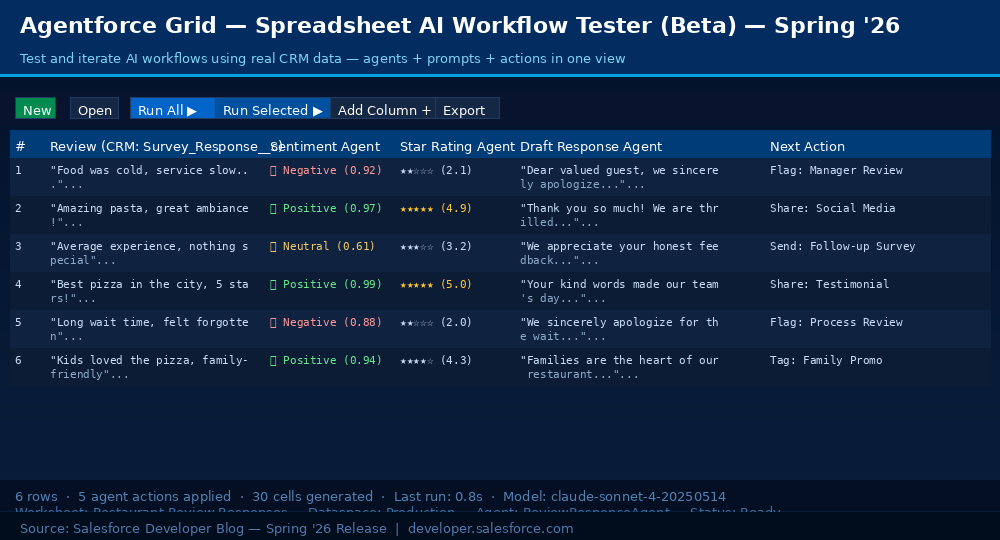
3. Agent Grid
Agentforce Grid is a spreadsheet-like environment for testing AI workflows against real CRM data. Every row is a CRM record, every column is an agent action, every cell shows immediate AI output. No deployment cycle needed to validate logic changes.
4. Agentforce DX: Pro-Code in VS Code
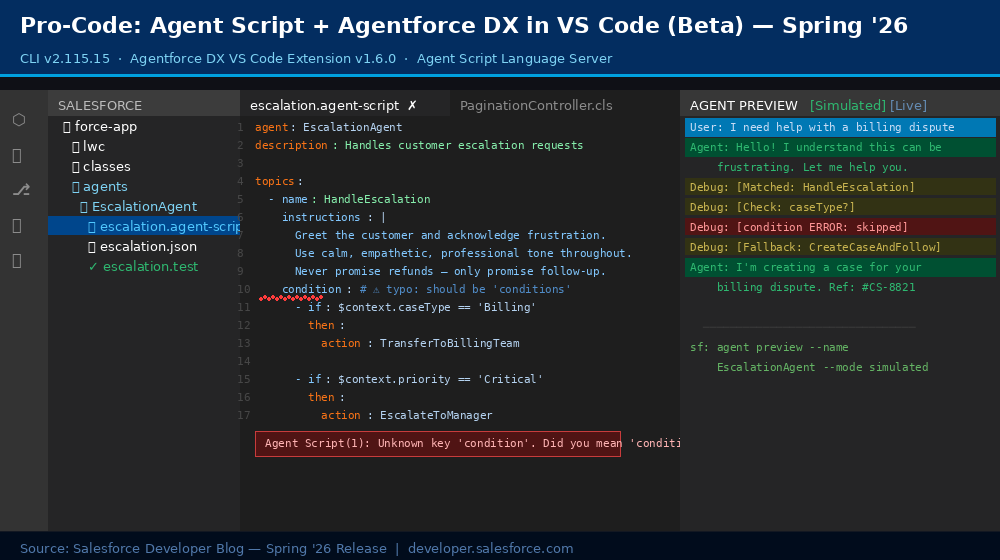
Agentforce DX is the pro-code equivalent of the Builder UI. Build, test, and deploy agents in VS Code and the Salesforce CLI without context switching. Retrieve an admin-built agent from Agentforce Builder, pull it locally, and refine it with complex logic.
- Language Server: Syntax highlighting, red squiggles for errors, internal validation, and outline support for Agent Script files.
- Simulated preview: Test agent logic with mocked actions. Fast iteration, no org resources consumed.
- Live preview: Connect to real Apex, flows, and org data for end-to-end testing.
5. Agentforce Vibes: AI Developer Tooling
Agentforce Vibes is an AI-powered developer assistant available as a VS Code extension and in the Agentforce Vibes IDE. Spring ’26 delivers the improvements from versions 3.3.0 through 3.8.0, smarter planning, better context management, and a streamlined MCP experience.
1. /deep-planning, Structured Complex Workflows
Type /deep-planning in the Agentforce Vibes chat to invoke a structured four-step approach for complex tasks:
- Scan: Agent scans your codebase for relevant context and existing patterns.
- Clarify: Agent asks targeted questions before writing any code.
- Plan: A comprehensive implementation plan is generated for your review.
- Execute: Task launches with all context loaded. A persistent Focus Chain keeps the agent on target across context resets.
2. MCP Auto-Approval & Performance
- Auto-approved: All read-only Salesforce DX MCP server tools, no more prompts for safe queries.
- Still requires approval: All write operations, insert, update, delete, and deploy.
- Performance: Toggling auto-approve no longer triggers server reconnections.
- UX: MCP tab renamed from “Installed” to “Configure”.
Salesforce CLI Updates
Spring ’26 adds three notable CLI improvements: unified logic testing, package source retrieval, and quality-of-life improvements for login timeouts and test polling.
|
1 2 3 4 5 6 7 8 9 10 11 12 13 14 15 16 17 |
# Unified Logic Testing (Beta), run Apex + Flow tests in one request sf apex run test --test-level RunAllTestsInOrg --unified-logic-testing # Retrieve 2GP or unlocked package source metadata locally sf package version retrieve \ --package 04tXXXXXXXXXXXXXXX \ --output-dir ./retrieved-package \ --target-dev-hub devhub@example.com # Set custom OAuth login timeout (prevents indefinite hang) export SF_WEB_OAUTH_SERVER_TIMEOUT=180000 # 3 minutes in milliseconds # Adjust test result polling interval to reduce API calls sf apex run test \ --class-names MyClassTest \ --poll-interval 10 \ --target-org my-org |
Data 360 Monthly Updates
Data 360 ships on a monthly cadence. The headline addition for developers in this release is the new ConnectApi.CDPQuery methods for querying data graphs directly from Apex.
|
1 2 3 4 5 6 7 8 9 10 11 12 13 14 15 16 17 18 19 20 21 22 |
// Query a data graph by record ID ConnectApi.CdpQueryResult byId = ConnectApi.CdpQuery.getDataGraphData( 'myDataspace', // dataspace API name 'UnifiedIndividual__dlm', // data model object '001Ws000001234' // record ID ); // Query by lookup key (e.g. an email address) ConnectApi.CdpQueryResult byKey = ConnectApi.CdpQuery.getDataGraphData( 'myDataspace', 'UnifiedIndividual__dlm', 'email', 'user@example.com' ); // Get data graph metadata and schema ConnectApi.DataGraphMetadata meta = ConnectApi.CdpQuery.getDataGraphMetadata( 'myDataspace', 'UnifiedIndividual__dlm' ); |
API Updates
1. Named Query API: Generally Available
Define and expose custom SOQL queries as versioned, reusable REST endpoints. Named Query APIs are faster and more efficient than equivalent Flow or Apex processes. Once defined, they are callable as standard REST resources.
|
1 2 3 4 5 6 7 8 9 10 11 12 13 |
# Endpoint auto-generated from a Named Query API named "RecentOpenCases" GET /services/data/v66.0/query/named/RecentOpenCases?flow__accountId=001Ws000001234 # Response { "totalSize": 3, "done": true, "records": [ { "Id": "5001234", "CaseNumber": "00001001", "Status": "Open" }, { "Id": "5001235", "CaseNumber": "00001002", "Status": "Open" }, { "Id": "5001236", "CaseNumber": "00001003", "Status": "Open" } ] } |
2. Session IDs in Outbound Messages: Removed
Session IDs can no longer be sent in outbound messages as of February 16, 2026. Audit Setup > Integrations > Outbound Messages. Update all outbound message subscribers to authenticate using OAuth instead of reading a session ID from the message payload.
Security: Three Mandatory Changes
Spring ’26 brings three mandatory security changes. These are not optional improvements. Every Salesforce development team needs to review and act on each one.
1. External Client Apps Replace Connected Apps
Creating new Connected Apps is disabled by default for all orgs. Existing Connected Apps continue to work normally, and nothing breaks immediately. But all new integrations must now use External Client Apps (ECA).
| Dimension | Connected Apps (Legacy) | External Client Apps (New) |
|---|---|---|
| Create new | Disabled by default | Fully supported |
| Existing apps | Continue working | Migration target, plan your timeline |
| 2GP packaging | Limited support | Full support |
| Migration path | App Manager > Migrate to ECA | Original becomes read-only post-migration |
2. Triple DES SAML Retirement
SAML SSO using Triple DES will stop functioning entirely in Summer ’26. Find affected configs at Setup > Identity > Single Sign-On Settings, look for ‘Triple DES’ in the algorithm column. Migrate to AES-128 or AES-256 now. User lockouts at the deadline require emergency Salesforce Support.
3. Session ID in Outbound Messages: Already Removed
If you have any outbound messages still attempting to send session IDs, they are already failing. Audit and update the OAuth authentication immediately. See Section 8.2 for details.
Quick Reference, All Spring ’26 Features
| Feature | Area | Status | Action Required |
|---|---|---|---|
| lwc:on, dynamic event listeners | LWC | GA · API v66 | Available now, use freely |
| GraphQL executeMutation | LWC | GA · API v66 | Upgrade to API v66 in sf-project.json |
| @salesforce/lightning-types TypeScript | LWC | Dev Beta | npm install --save-dev @salesforce/lightning-types |
| Complex Template Expressions | LWC | Beta | Sandbox first, enable Beta in Setup |
| standard__flow PageReference | LWC | GA | Available now |
| Error Console | LWC | GA | Setup > User Interface > Advanced Settings |
| Apex Cursors + PaginationCursor | Apex | GA · API v66 | Available now, no config needed |
| RunRelevantTests | Apex / Deploy | Beta | --test-level RunRelevantTests in CLI |
| Picklist values by record type | Apex | GA | ConnectApi.RecordUi.getPicklistValuesByRecordType() |
| Blob.toPdf() new engine | Apex | GA (Summer '26 enforced) | Test in sandbox, check font rendering |
| Agentforce Builder (Canvas + Script) | Agentforce | Beta | Enable Beta in Setup |
| Agent Script DSL | Agentforce | Beta | Install Agent Script VS Code extension |
| Agent Grid | Agentforce | Beta | Available in the Agentforce app |
| Named Query API | API | GA | Setup > Integrations > Named Query API |
| External Client Apps | Security | MANDATORY | Use for all new integrations now |
| Triple DES SAML retirement | Security | Deadline Summer '26 | Migrate to AES-128 or AES-256 now |
| Session IDs in outbound messages | Security | REMOVED Feb 16 | Switch to OAuth immediately |
Related reading: For a comprehensive look at where mobile apps are headed this year, see our pillar guide on Mobile App Development Trends 2026, covering AI integration, framework choices, and USD cost benchmarks.
 0 comments












Leave a Comment
Your email address will not be published. Required fields are marked *