

TL;DR:
|
Remember 1970’s classic action video game – Breakout, a nostalgic game where eight rows of bricks line the top portion of the screen, and the player's goal is to destroy the bricks by repeatedly bouncing a ball off a paddle into them.
Designed by two popular names in the gaming community Nolan Bushnell and Steve Bristow, it became a worldwide commercial success.
Coming back to the current year, while the game continues to be one of the eye candies and most admired of all time, a new spike to create your own Breakout-like game has come to picture.
Introducing– Flame, a game engine built on top of Flutter, a Google created open-source software development kit (SDK) that is flexible, open-source and runs everywhere on the platform.
Best part is Flutter Flame is built for everyone, hence, if you are reading this as a non-tech individual, you’ll be understanding in detail what is Flutter flame, how to use it, whether its free, a quick comparison between flame and unity, and even prepare yourself for practical, getting started tutorial on create a breakout-style video game using Flame engine with Flutter.
Let’s jump right in!
What is Flutter Flame?
Flutter Flame is a 2D game engine packaged as a Flutter library. According to its official pub.dev listing, Flame "provides a complete set of out-of-the-way solutions for common problems that games developed with Flutter might share."
In plain terms: Flutter gives you a rendering pipeline and widget system; Flame adds the missing pieces every game needs.
You install it like any other Dart package by adding flame: ^1.35.0 to your pubspec.yaml. From there, you extend the FlameGame class, drop a GameWidget into your Flutter widget tree, and you're running a game loop.
The relationship between Flutter and Flame
Every Flame game is technically Flutter app development services, Flame doesn't replace Flutter, it sits on top of it. This matters for three reasons:
- You inherit Flutter's reach. Flame supports all six Flutter platforms: iOS, Android, web, Windows, macOS, and Linux. One codebase, six targets.
- You can mix Flutter widgets with Flame games. Drop a Flame game inside a regular Flutter Scaffold, overlay menus and HUDs as Flutter widgets, and use Flutter's navigation for game screens.
- You write Dart, not C# or C++. If you've shipped a Flutter app, you already know 80% of what you need to build a Flame game.
You will read about this in detail in the following sections.
Core features Flame adds to Flutter
The Flame engine bundles seven foundational systems that vanilla Flutter doesn't include:
- A game loop: the FlameGame class runs update() and render() every frame, decoupled from Flutter's widget rebuild cycle.
- The Flame Component System (FCS): components are persistent, mutable game objects (think enemies, bullets, players), unlike Flutter's immutable widgets.
- Collision detection: built-in hitboxes (RectangleHitbox, CircleHitbox, PolygonHitbox) plus optional integration with Forge2D, a Box2D physics port.
- Effects and particles: declarative animations (MoveEffect, RotateEffect, ScaleEffect) and a particle system for explosions, smoke, and trails.
- Sprite and animation handling: SpriteComponent, SpriteAnimationComponent, and sprite sheet utilities.
- Gesture and input handling: taps, drags, keyboard events, joysticks, and gamepad support via bridge packages.
- Asset management: utilities for loading images, audio, and tile maps without manually wrestling with Flutter's asset pipeline.
Bridge packages that extend Flame
Flame's design is intentionally minimal, it avoids bundling features most games don't need. Instead, the Blue Fire team maintains a set of bridge packages that integrate Flame with popular Flutter libraries. The key ones include:
Package | What it adds |
flame_audio | Sound effects and background music via the audioplayers package |
flame_forge2d | Box2D physics for realistic collisions, joints, and forces |
flame_tiled | Tile map support for Tiled-editor .tmx files |
flame_bloc | State management integration with the Bloc library |
flame_rive | Rive interactive animation playback |
flame_isolate | Run heavy computation on a Flutter Isolate |
flame_oxygen | Lightweight Entity Component System (ECS) framework |
flame_lottie | Lottie animation support |
flame_svg | SVG file rendering inside Flame |
flame_texturepacker | Sprite sheets generated by TexturePacker |
How long has Flutter Flame been around?
Flame's first commits date to 2018, with the 1.0 stable release landing in 2022. Since then it has shipped 35+ minor versions, the current 1.35.0 was published in April 2026.
That release cadence (roughly one minor version per month) is faster than Unity's annual LTS cycle and signals an actively maintained ecosystem rather than a hobby project gathering dust.
The community gathers on the Blue Fire Discord server and the Stack Overflow [flame] tag, and the team runs an annual Flame Game Jam on itch.io every March.
When you should care about Flame
If you're a Flutter developer who has ever wanted to build a side-scrolling platformer, a card game, a puzzle game, an idle game, or anything with a game loop and moving sprites, Flame is the lowest-friction path to shipping it.
You don't have to learn C#, install a 30 GB editor, or rebuild your codebase from scratch. You add one line to pubspec.yaml and you're in.
What Flame is not, however, is a Unity replacement for every project. It can't do 3D. It has no visual scene editor. There's no asset store. We'll cover where it falls short, and where it wins outright, in the sections that follow.
Flutter Flame vs Flutter: What's the Difference?
Flutter is a UI framework for building cross-platform apps. Flame is a 2D game engine built on top of Flutter that adds game-specific tools: a game loop, component system, collision detection, and sprite animations.
Every Flame game is technically a Flutter app, but most Flutter apps aren't Flame games. You install Flame as a Dart package by adding it to pubspec.yaml.
Confusion between the two is common because they share the same underlying graphics pipeline.
Flutter renders everything through Skia (or Impeller on iOS), and Flame uses that same renderer, it just gives you game-shaped abstractions on top. Here's the practical breakdown:
Aspect | Flutter | Flutter Flame |
What it is | UI framework | 2D game engine |
Built for | Apps, dashboards, websites | 2D games |
Game loop | No | Yes (FlameGame) |
Collision detection | No | Yes (built-in + Forge2D) |
Sprite system | No (use Image widget) | Yes (SpriteComponent) |
Component model | Widgets (immutable, rebuilt) | Components (persistent, mutable) |
Built by | Blue Fire team (community) | |
Relationship | Foundation | Package on top |
The key distinction is statefulness. Flutter widgets are immutable and get rebuilt on every state change, fine for UI, painful for games where you need a sprite to keep its position, velocity, and animation state across thousands of frames. Flame components are mutable and persistent, which is exactly what game logic needs.
What Can You Build With Flutter Flame? (And Can It Do 3D?)
Flutter Flame is strictly 2D, it cannot build 3D games. It excels at hyper-casual, puzzle, card, platformer, top-down shooter, and tile-based games.
For 3D in the Flutter ecosystem, you can use packages like flutter_unity_widget (which embeds Unity inside a Flutter app) or three_dart, but neither matches Flame's polish. If you need 3D natively, Unity, Godot, or Unreal Engine are the right tools.
Genres that work well in Flame:
- Hyper-casual: tap-to-play, endless runners, one-button games
- Puzzle: match-three, Sudoku, sliding puzzles, minesweeper variants
- Card games: solitaire, card battlers, deckbuilders
- Platformers: 2D side-scrollers like Super Dash
- Top-down shooters: twin-stick, bullet hell, space shooters
- Tile-based RPGs: Pokémon-style movement using flame_tiled
- Educational and incremental games: idle clickers, learning apps with game mechanics
If you genuinely need 3D, first-person, vehicle physics, full polygonal characters, Flame is the wrong tool. The Flutter framework can render simple 3D scenes through Impeller and the new scene API, but it's nowhere near a production 3D engine. Don't fight the tools.
Quick Reference
Flutter Flame supports 2D games only. Both the official documentation and the pub.dev listing confirm Flame is a 2D engine. For 3D games, developers use Unity, Godot, or Unreal Engine, or embed Unity inside a Flutter app via the flutter_unity_widget package.
Is Flutter Flame Free? Licensing & Costs Explained
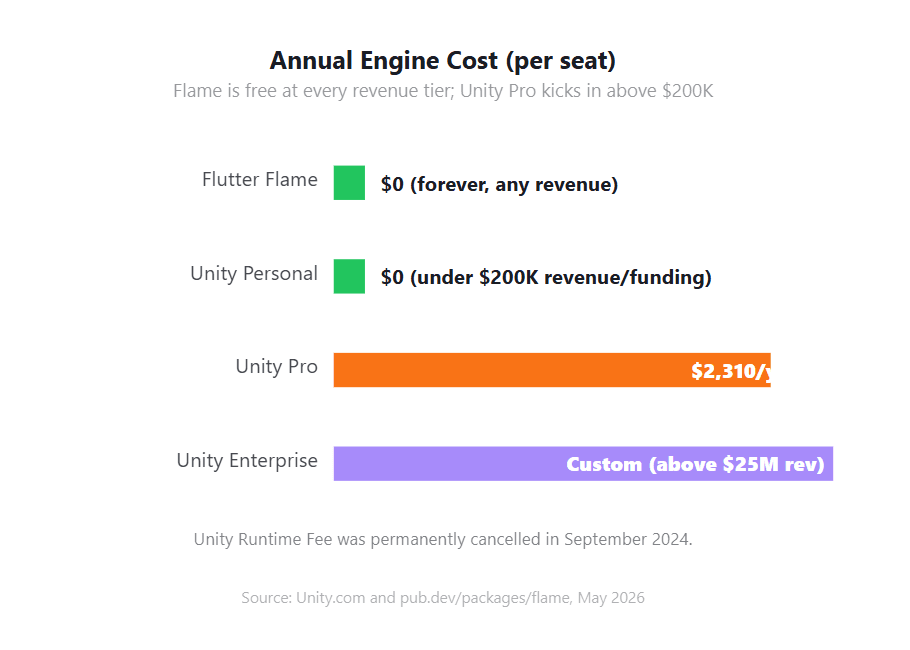
Yes, Flutter Flame is completely free. It's released under the MIT license, which permits unlimited commercial use with no royalties, runtime fees, or seat charges. The only requirement is including the original copyright notice in your distribution.
Flame has zero hidden costs, no asset store fees, and no revenue thresholds. Unity, by contrast, requires Pro at approximately $2,310 per seat per year above $200,000 in annual revenue.
Here's the licensing breakdown in plain terms. Under MIT, you can:
- Ship commercial games without paying anyone
- Modify Flame's source code for your project
- Redistribute Flame, modified or not
- Use it in closed-source proprietary projects
The only thing you must do is include the MIT copyright notice somewhere your users can see it (typically a credits screen or open-source acknowledgments page). That's it. No telemetry, no splash screen, no per-install fees.
Two important notes on Unity costs that older articles get wrong.
- First, the Runtime Fee was permanently cancelled in September 2024, if you're reading 2023-era warnings about per-install charges, ignore them.
- Second, Unity raised Pro prices by 5% on January 12, 2026, taking the annual seat to roughly $2,310.
The Personal tier remains free for individuals and orgs under $200K in annual revenue or funding, and the "Made with Unity" splash screen is optional in Personal projects from Unity 6 onward.
Total cost of ownership matters too. Flame's engine spend is genuinely zero, but you'll still pay for art assets, music, backend services, app store fees, and your team's time. The licensing line item just doesn't exist.
Quick Reference
Flutter Flame is free under the MIT license, permitting unlimited commercial use with no royalties or runtime fees. Unity Personal is free for individuals or organizations earning under $200,000 in annual revenue or funding. Above that threshold, Unity Pro costs approximately $2,310 per seat per year as of January 2026.
How Fast Is Flutter Flame? Real FPS Benchmarks
Flutter Flame can hit 60 FPS comfortably for most 2D casual games.
In a 2024 independent benchmark by ex-Flutter team member Filip Hracek, Unity tracked the highest game-object count without frame drops on iOS, while Flame performed worse but stayed within the range needed for typical 2D game genres.
Notably, Unity throttles iOS games to 30 FPS by default to save battery, while Flame's FlameGame loop targets 60 FPS out of the box.
Hracek's benchmark, the only neutral third-party comparison that exists, built the same project ("The Bench") in vanilla Flutter, Flame, Godot, and Unity.
The project simulates a 2D game with a high-definition background, a moving sprite, variable wandering entities, 23 UI elements, and background music. All four were compiled in Release mode and tested on iOS (iPad Air, 4th gen) and Chrome on macOS.
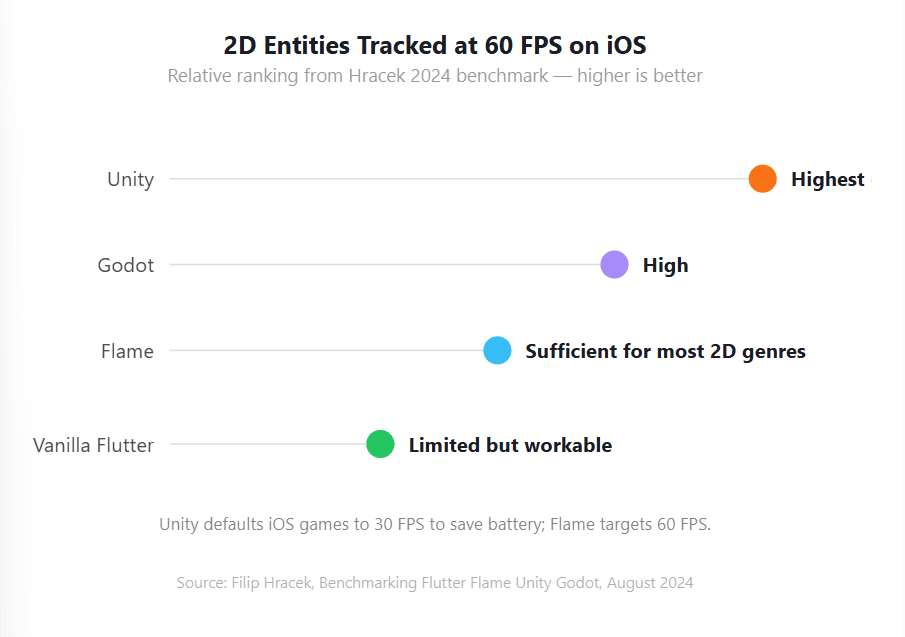
Hracek's takeaway, paraphrased: for most 2D casual games, Flame is fast enough that performance won't be your bottleneck.
For genres pushing thousands of on-screen entities, bullet hell, large-scale strategy, Unity has measurable headroom.
But Hracek also stresses that the streetlight effect applies: benchmarks measure what's easy to measure, not necessarily what matters for your specific game.
Common Flame Performance Pitfalls
If you do hit FPS issues, the usual suspects are predictable:
- Allocating objects inside update(). Reuse Vector2 instances, don't create new ones every frame.
- Forgetting CollisionType.passive. Static objects (walls, terrain) should be passive so the broadphase skips them.
- Loading sprites at runtime. Preload images via onLoad() and use a single texture atlas where possible.
- Excessive priority churn. Don't change component priorities every frame, it forces re-sorting of the entire component tree.
- Heavy work on the UI thread. Move expensive logic into a Dart isolate using flame_isolate.
For measurement, Flame ships FpsComponent and FpsTextComponent, drop them into your game during development for an on-screen frame counter.
For deeper profiling, Flutter DevTools has a frame timeline and a CPU sampler that work on Flame games unchanged.
Quick Reference
In Filip Hracek's 2024 benchmark, Unity tracked the highest game-object count without frame drops on iOS, while Flame remained sufficient for most 2D game genres. Unity throttles iOS games to 30 FPS by default to save battery, whereas Flame's FlameGame loop targets 60 FPS out of the box.
Flutter Flame Vs Unity: Full Comparison
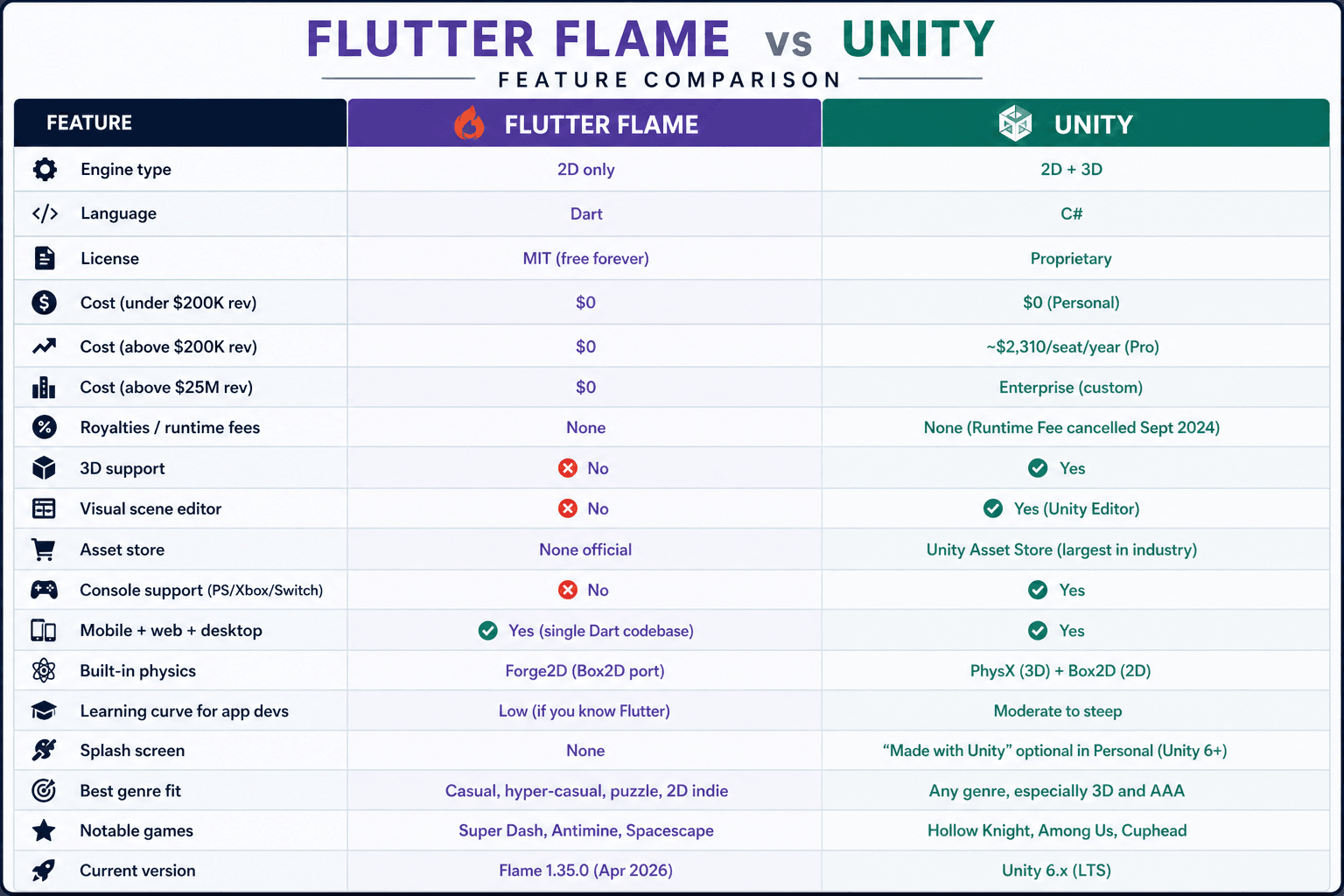
Choose Flutter Flame if you're building 2D casual, hyper-casual, or puzzle games and already know Dart or Flutter. Choose Unity if you need 3D, console support (PlayStation, Xbox, Switch), AAA-quality visuals, or a visual scene editor.
Flame is free forever under MIT; Unity Personal is free under $200K revenue but jumps to roughly $2,310 per seat per year for Pro. For 2D-only Flutter developers, Flame's learning curve is near zero.
Use Flame When…
- Your game is 2D and will stay 2D
- You already know Dart or Flutter, your existing codebase becomes a head start, not an obstacle
- You're targeting mobile and web from one codebase
- You want zero licensing concerns even if your game blows up commercially
- You need to embed a small game inside a larger Flutter app (a casual mini-game in a fitness app, for example)
Use Unity When…
- You need 3D, full stop
- You're shipping to consoles: Flutter doesn't support PlayStation, Xbox, or Switch, so Flame can't either
- You need a visual scene editor and a populated asset store
- You're a larger studio with C# expertise already on the team
- You need advanced animation tooling, shader graphs, or a baked lighting pipeline
The "I already know Flutter" angle is the most underrated reason to choose Flame. A Flutter developer can ship their first Flame game in days.
A Flutter developer learning Unity is essentially starting fresh, new language, new editor, new mental model.
That hidden onboarding cost rarely shows up in comparison tables, but it's the single biggest factor for most individual developers.
Games Built With Flutter Flame
The flagship example is Super Dash, a side-scrolling platformer Google commissioned from Very Good Ventures and shipped in just six weeks.
It runs on iOS, Android, and the desktop web at superdash.flutter.dev, and the source is open on GitHub. Six weeks from idea to multi-platform launch is the kind of velocity that makes Flame interesting for studios under deadline pressure.
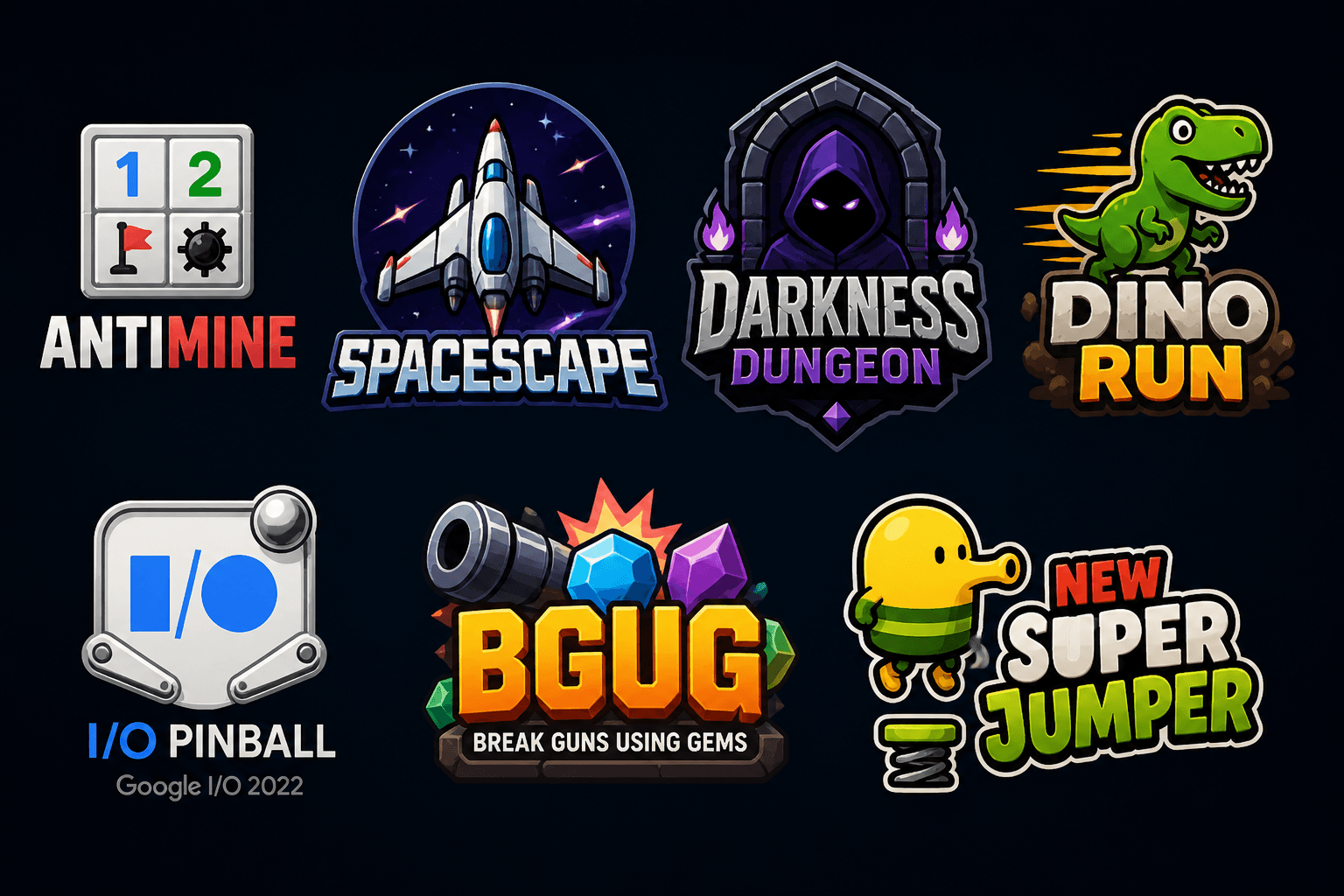
Other notable Flame games shipping today:
- Antimine: a Minesweeper-style puzzle on Google Play
- Spacescape: 2D top-down space shooter, available on the Play Store
- Darkness Dungeon: turn-based RPG by rafaelbarbosatec
- Dino Run: infinite side-scroller from DevKage
- I/O Pinball: Google's official Google I/O 2022 demo
- BGUG (Break Guns Using Gems): fast-paced platformer by FireSlime
- New Super Jumper: Doodle Jump clone using Forge2D physics
The full list lives in the awesome-flame GitHub repository, which catalogs games, tutorials, and community libraries.
We thought of why not help you create a basic-level MVP video gaming web platform, to help you design your first ever game using Flutter Flame, let’s get started.
Prerequisites for Building the Star Catcher MVP
Before you run any of the commands in Step 1, your machine needs the following set up. Plan for about 30-45 minutes if you're starting from zero.
1. Flutter SDK (3.24 or newer)
The MVP uses Flame 1.35.0, which requires Flutter 3.24+. Install it from flutter.dev/docs/get-started/install for your OS.
Verify with:
flutter --version
You should see Flutter 3.24.x or higher and Dart 3.5+.
2. Web support enabled
Flutter ships with web support, but it has to be turned on. Run:
flutter config --enable-web
flutter devices
Chrome (web) should appear in the device list. If it doesn't, your Chrome install isn't being detected, install or update Google Chrome and re-run.
3. Google Chrome
Required for flutter run -d chrome. Any recent version (last 12 months) works. Chromium and Edge also work via flutter run -d edge if you prefer.
4. A code editor with Dart support
Either works:
- VS Code + the official Flutter and Dart extensions (lighter, what most tutorials use)
- Android Studio or IntelliJ IDEA + the Flutter plugin (heavier, better refactoring)
The MVP code is small enough that any plain text editor would work, but you'll want analyzer hints and auto-import for real development.
5. A terminal
macOS Terminal, iTerm2, Windows Terminal, PowerShell, or any Linux shell. All commands in the guide are POSIX-style, Windows users on PowerShell can run them as-is except for touch, which becomes:
New-Item lib/star_catcher_game.dart
6. Run flutter doctor once
Before starting Step 1, run:
flutter doctor
You need green checkmarks on at least:
- Flutter (Channel stable)
- Chrome - develop for the web
- VS Code (or Android Studio)
You don't need green checkmarks on Android toolchain, Xcode, or Visual Studio, the MVP targets web only. If those have red Xs, ignore them.
7. Knowledge prerequisites
You'll move faster if you already have:
- Basic Dart syntax: classes, async/await, generics. If you've done any Flutter, you're set.
- Basic Flutter widget concepts: StatelessWidget, MaterialApp, Scaffold. The HUD overlay uses these.
- Comfort with the terminal: running commands, navigating directories.
You do not need:
- Prior game development experience
- Knowledge of Flame specifically
- Knowledge of game loops, sprites, or collision detection (the MVP teaches all three)
8. Optional but useful
- Git: for version control as you experiment
- A Firebase, Netlify, or Vercel account: only needed for Step 6 (deployment). Free tiers cover an MVP comfortably.
How to Get Started with Flutter Flame: Build a Web Game MVP
The fastest way to learn Flame is to ship something playable. This walkthrough builds "Star Catcher" a complete browser game where falling stars must be caught with a paddle that follows your mouse. It runs in the browser at 60 FPS, uses real Flame collision detection, tracks score and lives, and deploys to any static host. Total build time: about 20 minutes.
Everything below is real, copy-pasteable code. You'll need Flutter 3.24 or newer with web support enabled. Verify with flutter doctor before starting.
Step 1: Create the project
Open your terminal and run:
flutter create --platforms=web star_catcher cd star_catcher The --platforms=web flag keeps the project lean by skipping Android, iOS, and desktop scaffolding. You can add them later with flutter create --platforms=android,ios . if needed.
Step 2: Add the Flame dependency
From inside the project folder, install the latest Flame package:
flutter pub add flame This automatically updates pubspec.yaml and runs pub get. Your pubspec.yaml dependencies should now include:
dependencies:

  flutter:

    sdk: flutter

  flame: ^1.35.0
Step 3: Replace lib/main.dart
Open lib/main.dart and replace the entire contents with this. This is your app entry point, it wraps the Flame game in a Flutter MaterialApp with a HUD overlay for score and game-over screen.
import 'package:flame/game.dart';

import 'package:flutter/material.dart';

import 'star_catcher_game.dart';


void main() {

  runApp(const StarCatcherApp());

}


class StarCatcherApp extends StatelessWidget {

  const StarCatcherApp({super.key});


  @override

  Widget build(BuildContext context) {

    return MaterialApp(

      title: 'Star Catcher',

      debugShowCheckedModeBanner: false,

      theme: ThemeData.dark(),

      home: Scaffold(

        backgroundColor: const Color(0xFF0b0d12),

        body: GameWidget<StarCatcherGame>.controlled(

          gameFactory: StarCatcherGame.new,

          overlayBuilderMap: {

            'hud': (context, game) => HudOverlay(game: game),

            'gameOver': (context, game) => GameOverOverlay(game: game),

          },

          initialActiveOverlays: const ['hud'],

        ),

      ),

    );

  }

}


class HudOverlay extends StatelessWidget {

  final StarCatcherGame game;

  const HudOverlay({super.key, required this.game});


  @override

  Widget build(BuildContext context) {

    return SafeArea(

      child: Padding(

        padding: const EdgeInsets.all(20),

        child: ValueListenableBuilder<int>(

          valueListenable: game.score,

          builder: (_, score, __) => ValueListenableBuilder<int>(

            valueListenable: game.lives,

            builder: (_, lives, __) => Row(

              mainAxisAlignment: MainAxisAlignment.spaceBetween,

              children: [

                Text('Score: \$score',

                    style: const TextStyle(fontSize: 22, fontWeight: FontWeight.bold)),

                Text('Lives: \$lives',

                    style: const TextStyle(fontSize: 22, fontWeight: FontWeight.bold)),

              ],

            ),

          ),

        ),

      ),

    );

  }

}


class GameOverOverlay extends StatelessWidget {

  final StarCatcherGame game;

  const GameOverOverlay({super.key, required this.game});


  @override

  Widget build(BuildContext context) {

    return Center(

      child: Container(

        padding: const EdgeInsets.all(32),

        decoration: BoxDecoration(

          color: Colors.black.withValues(alpha: 0.85),

          borderRadius: BorderRadius.circular(16),

        ),

        child: Column(

          mainAxisSize: MainAxisSize.min,

          children: [

            const Text('Game Over',

                style: TextStyle(fontSize: 36, fontWeight: FontWeight.bold)),

            const SizedBox(height: 8),

            Text('Final Score: \${game.score.value}',

                style: const TextStyle(fontSize: 20)),

            const SizedBox(height: 24),

            ElevatedButton(

              onPressed: game.restart,

              style: ElevatedButton.styleFrom(

                backgroundColor: const Color(0xFFf97316),

                foregroundColor: Colors.white,

                padding: const EdgeInsets.symmetric(horizontal: 32, vertical: 16),

              ),

              child: const Text('Play Again', style: TextStyle(fontSize: 18)),

            ),

          ],

        ),

      ),

    );

  }

}
Step 4: Create the game logic
Create a new file at lib/star_catcher_game.dart. This is where the actual Flame engine code lives, the game loop, the paddle, the falling stars, and collision detection.
touch lib/star_catcher_game.dartPaste the following into that file:
import 'dart:async';

import 'dart:math';

import 'package:flame/collisions.dart';

import 'package:flame/components.dart';

import 'package:flame/events.dart';

import 'package:flame/game.dart';

import 'package:flutter/foundation.dart';

import 'package:flutter/material.dart';


class StarCatcherGame extends FlameGame

    with HasCollisionDetection, MouseMovementDetector {

  final ValueNotifier<int> score = ValueNotifier(0);

  final ValueNotifier<int> lives = ValueNotifier(3);


  late Paddle paddle;

  late StarSpawner spawner;

  final Random _rng = Random();


  @override

  Color backgroundColor() => const Color(0xFF0b0d12);


  @override

  Future<void> onLoad() async {

    paddle = Paddle();

    spawner = StarSpawner(rng: _rng);

    await addAll([paddle, spawner]);

  }


  @override

  void onMouseMove(PointerHoverInfo info) {

    paddle.targetX = info.eventPosition.global.x;

  }


  void onStarCaught() {

    score.value += 10;

  }


  void onStarMissed() {

    lives.value -= 1;

    if (lives.value <= 0) {

      pauseEngine();

      overlays.remove('hud');

      overlays.add('gameOver');

    }

  }


  void restart() {

    score.value = 0;

    lives.value = 3;

    children.whereType<Star>().forEach((s) => s.removeFromParent());

    overlays.remove('gameOver');

    overlays.add('hud');

    resumeEngine();

  }

}


// ---------- Paddle ----------

class Paddle extends RectangleComponent

    with HasGameReference<StarCatcherGame>, CollisionCallbacks {

  double targetX = 0;

  static const double _speed = 12;


  Paddle()

      : super(

          size: Vector2(140, 18),

          paint: Paint()..color = const Color(0xFFf97316),

          anchor: Anchor.center,

        );


  @override

  Future<void> onLoad() async {

    position = Vector2(game.size.x / 2, game.size.y - 60);

    targetX = position.x;

    add(RectangleHitbox());

  }


  @override

  void update(double dt) {

    super.update(dt);

    final clampedTarget = targetX.clamp(size.x / 2, game.size.x - size.x / 2);

    position.x += (clampedTarget - position.x) * _speed * dt;

  }

}


// ---------- Star ----------

class Star extends CircleComponent

    with HasGameReference<StarCatcherGame>, CollisionCallbacks {

  final double fallSpeed;

  bool _caught = false;


  Star({required Vector2 position, required this.fallSpeed})

      : super(

          radius: 14,

          position: position,

          paint: Paint()..color = const Color(0xFF38bdf8),

          anchor: Anchor.center,

        );


  @override

  Future<void> onLoad() async {

    add(CircleHitbox());

  }


  @override

  void update(double dt) {

    super.update(dt);

    position.y += fallSpeed * dt;

    if (position.y > game.size.y + radius) {

      removeFromParent();

      if (!_caught) game.onStarMissed();

    }

  }


  @override

  void onCollisionStart(Set<Vector2> points, PositionComponent other) {

    super.onCollisionStart(points, other);

    if (other is Paddle && !_caught) {

      _caught = true;

      game.onStarCaught();

      removeFromParent();

    }

  }

}


// ---------- Spawner ----------

class StarSpawner extends Component with HasGameReference<StarCatcherGame> {

  final Random rng;

  double _timeSinceLast = 0;

  double _spawnInterval = 1.0;


  StarSpawner({required this.rng});


  @override

  void update(double dt) {

    super.update(dt);

    _timeSinceLast += dt;

    if (_timeSinceLast >= _spawnInterval) {

      _timeSinceLast = 0;

      _spawnInterval = 0.6 + rng.nextDouble() * 0.7;

      _spawnStar();

    }

  }


  void _spawnStar() {

    final x = 30 + rng.nextDouble() * (game.size.x - 60);

    final speed = 180 + rng.nextDouble() * 160;

    game.add(Star(position: Vector2(x, -20), fallSpeed: speed));

  }

}
Step 5: Run it locally
Launch the game in Chrome:
flutter run -d chromeA browser window opens. Move your mouse left and right, the orange paddle follows you. Blue stars fall from the top. Catch them for +10 points; miss three and the game ends. If everything works, you've just shipped your first Flame game.
What just happened, briefly
- FlameGame drives the 60 FPS game loop and renders the canvas.
- HasCollisionDetection turns on Flame's broadphase collision system.
- MouseMovementDetector hooks browser mouse events into the game.
- Each Star has a CircleHitbox; the Paddle has a RectangleHitbox. When they overlap, onCollisionStart fires.
- The HUD uses Flutter ValueNotifiers, Flame triggers them, and Flutter rebuilds the score and lives text outside the game canvas.
Step 6: Build for production and deploy
When you're ready to ship, build a release-mode web bundle:
flutter build web --release --wasmThe --wasm flag compiles to WebAssembly for better performance. The output lands in build/web/ as static files (index.html, JavaScript, WASM, and assets), drop it onto any static host:
# Firebase Hosting firebase init hosting firebase deploy # Netlify (drag-and-drop or CLI) netlify deploy --dir=build/web --prod # GitHub Pages (push build/web to gh-pages branch) npx gh-pages -d build/web # Cloudflare Pages, Vercel, S3 + CloudFront — all work the same wayThat's a full deployable web game in six steps. Bundle size is around 2–3 MB compressed, first paint under two seconds on a typical broadband connection.
Where to Take It Next
This MVP is a foundation, not a finished product. Realistic next steps to turn it into a publishable game:
- Add sprite assets. Replace the orange rectangle and blue circles with a sprite sheet using SpriteComponent and SpriteAnimationComponent. Drop PNG files into assets/images/, register them in pubspec.yaml under flutter: assets:, and load them in onLoad.
- Add sound. Add flame_audio, drop sound files into assets/audio/, and call FlameAudio.play('catch.mp3') in onStarCaught.
- Add difficulty progression. Increase fallSpeed as the score climbs.
- Add touch controls. Replace MouseMovementDetector with DragCallbacks for mobile.
- Add a leaderboard. Wire it to Firebase Firestore using the standard firebase_core + cloud_firestore packages, Flame is just a Flutter package, so any Flutter backend integration works unchanged.
For a more structured deeper dive, Google's official Brick Breaker codelab walks through building a full Breakout clone using Flame's Components, Effects, and collision system.
Resources worth bookmarking:
- docs.flame-engine.org official documentation, version-pinned
- examples.flame-engine.org interactive demos with viewable source for every feature
- The Blue Fire Discord server for live community help
- The Flame tag on Stack Overflow for searchable Q&A
Why Choose DianApps for Building Your Video Gaming Platform
You've seen what Flutter Flame can do, fast 2D games, single-codebase deployment, zero royalties. But knowing the engine isn't the same as shipping a polished, monetized, scalable game.
That's where the right mobile app development company makes the difference between an MVP that stays an MVP and a game that earns on the App Store.
DianApps is a mobile-first development studio with deep Flutter expertise and a track record of shipping cross-platform games that actually launch. Here's why teams pick them for Flutter Flame projects specifically.
1. Flutter-Native Expertise, Not Outsourced Game Teams
Most game development shops are Unity-first and treat Flutter as a bolt-on. DianApps is the inverse, Flutter is core to their stack, which means Flame fits naturally into their workflow rather than being a side experiment.
Their developers ship Flutter apps fast, so the Dart, pub.dev, and Flutter web/mobile build tooling is muscle memory, not learning curve.
For a Flame project, that translates to fewer architectural mistakes, cleaner state management (Bloc, Riverpod, or flame_bloc, they've used all three), and faster turnaround on platform-specific issues like iOS Impeller rendering quirks or web WASM build optimization.
2. End-to-End MVP to Launch in Weeks, Not Months
The Super Dash demo proved a Flame game can go from idea to multi-platform launch in six weeks. DianApps operates on similar timelines for casual and hyper-casual games. A typical engagement looks like:
- Week 1-2: Game design document, art direction, prototype
- Week 3-5: Core gameplay, levels, monetization hooks (ads, IAP)
- Week 6-8: Polish, QA across iOS/Android/web, store submission
This compression matters because casual games live or die on time-to-market. The longer your idea sits in development, the more likely a competitor ships a similar concept first.
3. Built-In Monetization and Backend Integration
Shipping a game is only half the work, making money from it is the other half. DianApps brings pre-built integrations for:
- Ads: Google AdMob, Unity Ads, AppLovin via Flutter packages
- In-app purchases: Native iOS StoreKit and Android Billing through in_app_purchase
- Leaderboards and achievements: Game Center, Google Play Games Services
- Backend: Firebase Auth, Firestore, Cloud Functions, and Firebase Analytics
- Multiplayer: Real-time sync via Supabase, Firebase Realtime Database, or custom WebSocket servers
You don't have to figure out how to wire any of this in yourself. The integrations come pre-tested in production apps.
4. Cross-Platform from a Single Codebase – Done Right
Flutter and Flame promise "one codebase, six platforms," but the reality is messier. Web games behave differently from mobile games. iOS gestures don't translate cleanly to Android. Desktop input is its own world.
DianApps has shipped Flutter apps across iOS, Android, web, Windows, macOS, and Linux, so they know which abstractions hold and which leak.
For a Flame project, that means your game actually feels native on each platform, touch controls on mobile, keyboard/mouse on web, gamepad support where it matters, without rewriting core logic for each target.
5. Design and Art Direction Under One Roof
Code quality alone doesn't make a game memorable. DianApps offers in-house UI/UX design services and game art capabilities, so you don't have to coordinate between separate studios for sprites, animations, sound design, and UI.
That's especially valuable for casual games where polish is the differentiator, a well-animated paddle and satisfying particle effect on a "catch" can be the difference between 5-star reviews and 3-star reviews.
6. Post-Launch Live-Ops Support
Most agencies disappear once the App Store badge goes up.
DianApps stays on for live-ops: weekly content updates, A/B testing of monetization tweaks, crash monitoring via Firebase Crashlytics, and performance regression tracking through Flutter DevTools.
For games that rely on retention (puzzle, idle, hyper-casual), that ongoing support is often what determines lifetime revenue.
7. Transparent Pricing and Flexible Engagement Models
DianApps offers fixed-scope project pricing for clearly-defined MVPs and dedicated-team models for ongoing live-ops or larger games. No royalty cuts, no surprise runtime fees, your engine is MIT-licensed Flame, your code is yours, your revenue is yours.
Bottom Line
Flutter Flame is the right tool when you're building 2D games and want to stay in the Flutter ecosystem. It's free under MIT, runs everywhere Flutter runs, and ships in real production games today.
The current 1.35.0 release is stable, fast enough for most casual genres, and backed by an active community.
It's the wrong tool if you need 3D, console releases, or a visual editor. For those, Unity remains the better call despite its pricing complexity.
If you already know Flutter, the practical move is to spend an afternoon with Google's Brick Breaker codelab and decide for yourself. The "is it the right engine" question usually answers itself fifteen minutes into your first prototype.









Leave a Comment
Your email address will not be published. Required fields are marked *