

Salesforce vs HubSpot: Which CRM Should You Actually Choose in 2026?
A business team reviewing CRM dashboards on a laptop and whiteboard during a strategy meeting in a modern office
We’ve implemented both Salesforce and HubSpot for over 50 clients combined. Startups. Mid-market companies. Enterprises with 2,000+ sales reps. And the honest answer to “which CRM is better” is always the same: it depends on who’s asking.
Salesforce holds 21.7% of the global CRM market, more than double HubSpot’s 6.4% (IDC, 2025). But market share doesn’t mean it’s the right fit for your business. We’ve seen 10-person teams drown in Salesforce complexity. We’ve also watched 200-person sales orgs outgrow HubSpot in under a year.
This post isn’t a Salesforce sales pitch. We work with Salesforce daily, yes. But we’ve recommended HubSpot to clients when it was clearly the better call. Here’s everything we’ve learned from being on both sides of this decision.
TL;DR: Salesforce dominates with 21.7% CRM market share and unmatched customization, but HubSpot’s free tier and faster onboarding make it the smarter pick for teams under 10 reps (IDC, 2025). Your decision comes down to team size, sales complexity, and how much you’re willing to spend on implementation.
What’s the 30-Second Answer on Salesforce vs HubSpot?
According to Gartner’s 2025 CRM Magic Quadrant, Salesforce leads in “completeness of vision” while HubSpot ranks highest in user satisfaction among mid-market buyers. The quick framework below captures 80% of the decision, no spreadsheet required.
Choose HubSpot if: - You have fewer than 10 sales reps - Annual revenue is under $10M - Growth is marketing-led (inbound, content, SEO) - You don’t have a dedicated IT team or Salesforce admin - You need a CRM running within 2 weeks, not 2 months
Choose Salesforce if: - You have 10+ sales reps across multiple teams - Your sales cycle involves multiple stakeholders and stages - You need heavy customization of custom objects, workflows, and approvals - Multiple departments (sales, service, marketing) need one platform - You’re planning for scale beyond 500 users
That’s the short version. But the details matter. A lot.
Gartner’s 2025 CRM Magic Quadrant places Salesforce first in “completeness of vision” while HubSpot earns top marks for mid-market user satisfaction (Gartner, 2025). The right choice depends primarily on team size, sales complexity, and IT capacity.
How Do Salesforce and HubSpot Compare Feature by Feature?
A 2025 G2 analysis of over 14,000 verified reviews found HubSpot scored 8.7/10 on ease of use versus Salesforce’s 7.1/10 (G2, 2025). But ease of use is just one dimension. Here’s how they stack up across every category that matters.
Feature | Salesforce | HubSpot |
Starting Price | $25/user/month (Starter Suite) | Free (up to 2 users); $20/user/month (Starter) |
Enterprise Price | $500/user/month (Unlimited+) | $150/user/month (Enterprise) |
Ease of Use | Steep learning curve, admin often required | Intuitive UI, most teams self-serve |
Customization | Near-limitless (Apex, LWC, Flow Builder) | Moderate (custom properties, workflows, ops hub) |
Reporting | Advanced cross-object, forecasting, Einstein Analytics | Good for standard metrics, less flexible for custom reports |
Marketing Automation | Marketing Cloud (separate license) | Built-in Marketing Hub is best-in-class for inbound |
Sales Features | CPQ, territory management, opportunity scoring, Agentforce | Deal pipelines, sequences, playbooks, forecasting |
Service/Support Tools | Service Cloud full case management, field service | Service Hub ticketing, knowledge base, and feedback |
Integrations | 7,000+ apps on AppExchange | 1,600+ apps in the marketplace |
API Access | Full REST/SOAP/Bulk APIs | REST API on Pro+ plans |
AI Features | Einstein AI + Agentforce (autonomous agents) | Breeze AI (content, prospecting, customer agent) |
Mobile App | Full-featured, offline-capable | Solid, more limited offline |
Learning Curve | 3-6 months for proficiency | 1-4 weeks for most users |
Implementation Time | 6-16 weeks (typical) | 1-4 weeks (typical) |
Here’s the thing. Tables don’t tell the full story. A feature existing on paper and a feature working well in practice are two different realities.
What Does Salesforce vs HubSpot Actually Cost?
License pricing is a starting point, not the finish line. Nucleus Research found that companies spend $3.71 in customization and implementation for every $1 spent on Salesforce licenses (Nucleus Research, 2024). That ratio flips the math entirely for budget-conscious teams.
Salesforce Pricing Breakdown (2026)
Edition | Price/User/Month | Best For |
Starter Suite | $25 | Very small teams, basic CRM |
Pro Suite | $100 | Growing teams, more automation |
Enterprise | $165 | Mid-market, custom workflows |
Unlimited | $330 | Large teams, full platform access |
Unlimited+ (Einstein 1) | $500 | AI-first enterprises |
But those are just license fees. Real-world Salesforce costs include:
Implementation: $75,000 - $300,000+ depending on complexity (Salesforce Ben, 2025)
Dedicated admin: $80,000 - $120,000/year salary in the US (Glassdoor, 2025)
Third-party apps: $500 - $5,000/month for common add-ons
Ongoing customization: $150 - $250/hour for Salesforce developers
HubSpot Pricing Breakdown (2026)
Edition | Price/User/Month | Best For |
Free Tools | $0 (up to 2 users) | Solopreneurs, micro teams |
Starter | $20 | Small teams, basic automation |
Professional | $100 (Sales Hub) | Growing sales orgs |
Enterprise | $150 (Sales Hub) | Larger teams, advanced reporting |
HubSpot’s hidden costs are lower but still real:
Onboarding: $3,000 - $12,000 (required for Pro and Enterprise)
Admin: Most teams don’t need a dedicated admin, that’s a genuine cost saver
Add-ons: API limits, custom reporting, and advanced permissions are gated behind higher tiers
Total Cost of Ownership: A Real Comparison
For a 25-person sales team over 3 years:
Cost Category | Salesforce (Enterprise) | HubSpot (Professional) |
Licenses (3 years) | $148,500 | $90,000 |
Implementation | $150,000 | $8,000 |
Admin/Maintenance | $300,000 | $45,000 |
Customization/Add-ons | $120,000 | $30,000 |
Total 3-Year TCO | $718,500 | $173,000 |
Look, those numbers aren’t meant to scare you off Salesforce. They’re meant to prepare you. If your business needs what Salesforce offers, that investment pays for itself many times over. But if you don’t need that depth? You’re burning cash.
We’ve scoped over 30 Salesforce implementations in the past two years. The median project cost for a mid-market company (50-200 employees) lands around $125,000 for initial setup, including data migration, custom workflows, and basic training. HubSpot projects for similar-sized teams typically come in under $15,000.
Companies spend $3.71 in customization for every $1 on Salesforce licenses (Nucleus Research, 2024). For a 25-person sales team, three-year total cost of ownership can reach $718,500 for Salesforce Enterprise versus approximately $173,000 for HubSpot Professional.
Where Does HubSpot Win Over Salesforce?
HubSpot earned an 87% customer satisfaction score in G2’s 2025 CRM report, compared to Salesforce’s 78% (G2, 2025). That gap isn’t about features; it’s about usability, onboarding, and day-to-day experience. Here’s where HubSpot genuinely outperforms.
Ease of Use Isn’t Even Close
HubSpot was built for marketers and salespeople who don’t want to file IT tickets every time they need a new report. The interface is clean. Drag-and-drop workflows actually work. And your reps can be productive within days, not months.
Salesforce can do more. Much more. But that power comes with complexity that most small and mid-size teams don’t need and won’t use. Why pay for a Swiss Army knife when you need a good pair of scissors?
Marketing Hub Is Best-in-Class
Here’s where we’ll be direct. HubSpot’s Marketing Hub is better than Salesforce Marketing Cloud for most mid-market companies. It’s easier to set up, easier to maintain, and the content tools, blog, email, landing pages, and SEO are tightly integrated with the CRM.
Salesforce Marketing Cloud is powerful, but it’s a separate product with a separate learning curve and a separate price tag. For inbound-driven businesses, HubSpot wins this category outright.
The Free Tier Is Genuinely Useful
This isn’t a stripped-down demo. HubSpot’s free CRM includes contact management, deal tracking, email templates, meeting scheduling, and basic reporting. For a 3-5 person sales team testing the CRM waters, it’s often the smartest starting point.
Salesforce doesn’t offer a free tier. Period.
Lower Total Cost for SMBs
We covered the numbers above. For companies with under 50 employees and straightforward sales processes, HubSpot’s total cost of ownership is typically 60-75% lower than Salesforce when you factor in implementation, admin, and customization.
Salesforce is overkill for a 5-person sales team. Full stop. We’ve migrated three clients off Salesforce and onto HubSpot because they were paying enterprise prices for basic pipeline tracking. Each one reduced their annual CRM spend by over 60%.
Where Does Salesforce Win Over HubSpot?
Salesforce generated $37.9 billion in revenue in FY2025, a figure that reflects the platform’s dominance across large and complex organizations (Salesforce Annual Report, FY2025). When your needs outgrow a mid-market CRM, Salesforce is where you go. Here’s why.
Customization That Has No Ceiling
Salesforce lets you build almost anything. Custom objects, custom fields, custom page layouts, Apex triggers, Lightning Web Components, Flow automations with 100+ steps, the platform is essentially a development environment disguised as a CRM.
HubSpot has improved its customization significantly with Operations Hub and custom objects. But it still can’t match the depth. If your business process requires a 15-step approval chain with conditional routing across departments, Salesforce handles that natively. HubSpot doesn’t.
Enterprise Reporting and Forecasting
Salesforce’s reporting engine, especially with Einstein Analytics (now CRM Analytics), gives you cross-object reporting, historical trend tracking, AI-powered forecasting, and custom dashboards that pull data from any corner of your org.
HubSpot’s reporting is fine for standard metrics. Pipeline value, deal velocity, activity tracking. But the moment you need a custom report that joins data across three objects with filters and groupings? You’ll feel the limitations.
AppExchange Changes the Game
With over 7,000 pre-built applications on AppExchange (Salesforce AppExchange, 2026), Salesforce’s integration library dwarfs HubSpot’s 1,600+ marketplace apps. Need CPQ? DocuSign integration? Advanced territory planning? There’s a vetted, reviewed app for it.
And many AppExchange solutions are built by Salesforce ISV partners who maintain them full-time. The quality bar is higher than most people expect.
Einstein AI and Agentforce
This is where the gap is widening. Salesforce’s Agentforce platform, launched in late 2024 and expanded through 2025, lets businesses deploy autonomous AI agents that handle tasks like lead qualification, case routing, and even complex multi-step workflows without human intervention.
HubSpot’s Breeze AI is solid for content generation and basic prospecting. But it’s not in the same category as Agentforce for enterprise automation. If AI-driven operations are part of your roadmap, Salesforce is ahead by years.
Salesforce generated $37.9 billion in FY2025 revenue and offers 7,000+ AppExchange applications (Salesforce Annual Report, FY2025). Its Agentforce platform enables autonomous AI agents for lead qualification and case routing — capabilities that HubSpot’s Breeze AI doesn’t yet match.
When Should You Choose HubSpot?
HubSpot reported 228,000+ customers across 135 countries in 2025, with the majority being companies with under 200 employees (HubSpot Annual Report, 2025). That tells you exactly who this platform serves best. Specific scenarios where HubSpot is the right call:
You’re a marketing-led company. Your growth comes from content, SEO, social, and email. You need a CRM that talks to your marketing tools without duct tape.
Your sales process is linear. Leads come in, reps work them, deals close. No multi-departmental approvals. No complex quoting. No territory management.
You don’t have and don’t want a CRM admin. Your sales manager should be able to build reports and modify pipelines without calling IT.
You’re growing fast but lean. You need to move quickly. A 12-week implementation isn’t an option when you’re trying to hit this quarter’s revenue target.
Your budget is under $50K/year for CRM. Including all licenses, onboarding, and maintenance. HubSpot fits this budget comfortably. Salesforce rarely does.
Real talk: if you checked three or more of those boxes, start with HubSpot. You can always migrate later if you outgrow it.
When Should You Choose Salesforce?
Salesforce customers report an average 25% increase in revenue and a 35% increase in customer satisfaction after implementation (Salesforce Customer Success Metrics, 2025). But those returns require the right conditions. Here’s when Salesforce makes sense:
Your sales process is complex. Multiple products, custom pricing, long sales cycles, multiple decision-makers. Salesforce CPQ and opportunity management were built for this.
You need multi-department alignment. Sales Cloud, Service Cloud, Marketing Cloud, and Commerce Cloud — all sharing one data model. That’s powerful when your org has 200+ people across departments.
Customization is a requirement, not a nice-to-have. You’ve outgrown off-the-shelf solutions. Your processes are unique. You need a platform that bends to your business, not the other way around.
You have or can hire a Salesforce admin. Someone who maintains the org, builds reports, manages user permissions, and handles releases. Without this person, Salesforce becomes an expensive mess.
You’re planning for scale. Going from 50 to 500 users over the next 3 years? Salesforce scales without architectural rewrites. HubSpot starts creaking above 200 users with complex needs.
Salesforce customers report a 25% average revenue increase and 35% boost in customer satisfaction post-implementation (Salesforce, 2025). The platform delivers the strongest ROI for teams with 50+ users, complex sales cycles, and multi-department alignment needs.
Can You Use Both HubSpot and Salesforce Together?
Roughly 65% of companies use more than one CRM or sales tool simultaneously (Salesforce State of Sales Report, 2025). Running HubSpot alongside Salesforce isn’t just possible; it’s a strategy we’ve implemented multiple times. But it’s not always the right one.
When the Integration Makes Sense
The most common setup: HubSpot handles marketing (content, email, lead capture, nurturing) while Salesforce manages sales and service. HubSpot’s native Salesforce integration syncs contacts, companies, deals, and activity bidirectionally.
This works well when: - Marketing and sales operate on different timelines and workflows - Your marketing team is already embedded in HubSpot - You need HubSpot’s content tools but Salesforce’s sales infrastructure
When It Doesn’t
Integration adds complexity. Data sync issues, duplicate records, conflicting lifecycle stages, we’ve seen all of it. If your team is under 50 people, running both platforms usually creates more problems than it solves.
And there’s cost. Maintaining two platforms means two sets of licenses, two learning curves, and an integration that needs ongoing monitoring. For most mid-market companies, pick one and commit.
We’ve built about a dozen HubSpot-to-Salesforce integrations. The ones that work well share a common trait: clear ownership. Marketing owns HubSpot. Sales owns Salesforce. There’s a documented handoff point where a lead becomes an opportunity. Without that clarity, you get a mess.
How to Make Your Decision
Skip the analysis paralysis. Here’s a decision framework that works.
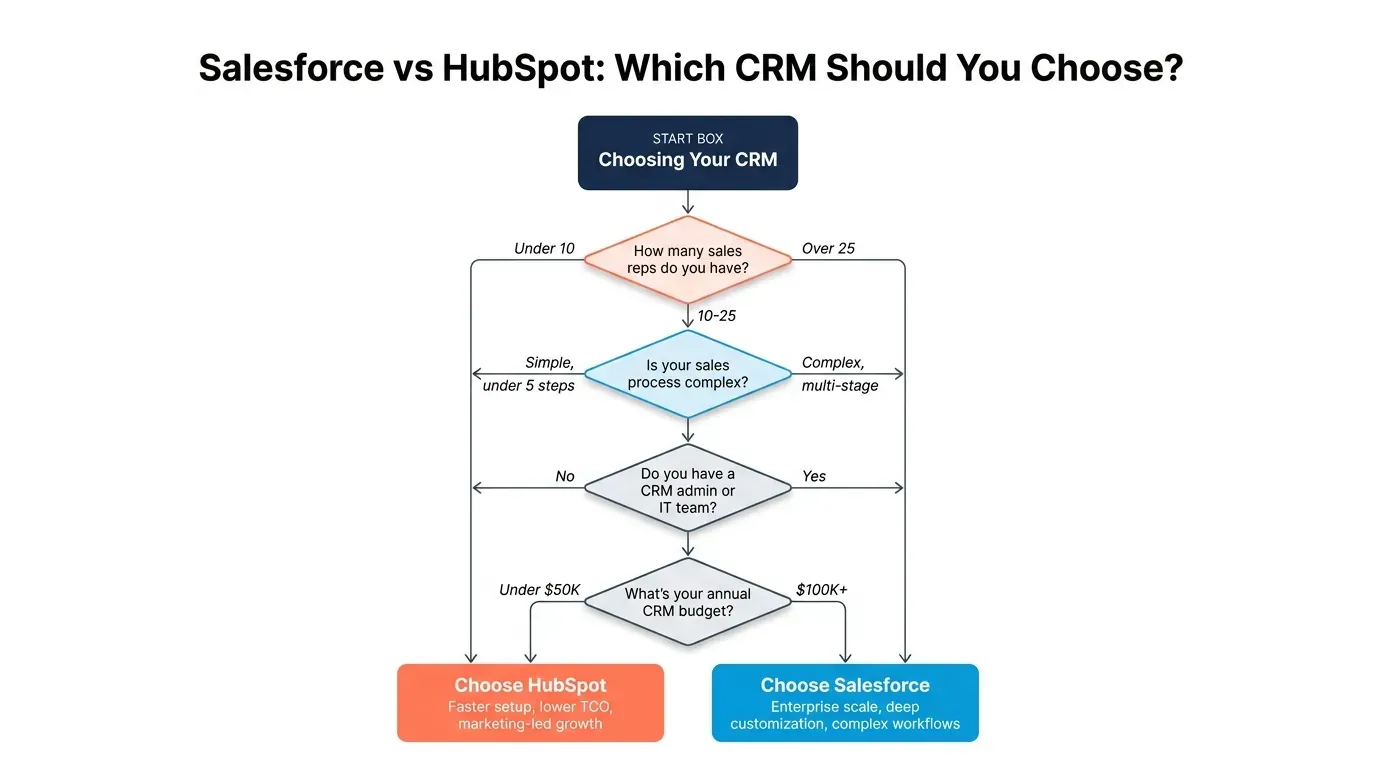
Step 1: Count your sales reps. Under 10? Start with HubSpot. Over 25? Lean toward Salesforce. Between 10-25? Keep reading.
Step 2: Map your sales process. If you can describe it in under 5 steps, HubSpot handles it well. If it takes a whiteboard and 30 minutes to explain, you probably need Salesforce.
Step 3: Check your IT capacity. No Salesforce admin? Does anyone know Apex or Flow Builder? HubSpot will serve you better out of the box.
Step 4: Calculate real costs. Not just licenses. Implementation. Training. Ongoing admin. Third-party apps. Use the TCO comparison above as a starting point.
Step 5: Think 3 years ahead. Where will you be in 2029? If you’re planning to double your sales team or add Service Cloud and CPQ, build on Salesforce from day one. Migrating later is expensive and disruptive.
And if you’re leaning toward Salesforce? Don’t go it alone. The platform’s power is real — but so is its complexity. A well-scoped implementation saves months of rework. Our Salesforce consulting team has helped companies across the US, Australia, and India get it right the first time. If you want to talk through scope and budget, we’re here.









Leave a Comment
Your email address will not be published. Required fields are marked *