















 0 comments





AI Overview:
|
If you’re using a modern Android app today, chances are you’re already interacting with on-device AI even if you don’t realize it.
Apps are no longer sending every piece of user data to distant servers and waiting for responses. Instead, they’re processing information directly on the device. The result? Faster interactions, smarter features, and privacy mechanisms that remain functional even when connectivity is unstable.
Across Manhattan’s fintech innovators, Brooklyn’s digital health platforms, SoHo’s retail experiences, and Queens’ logistics operations, product teams are redesigning Android applications around this shift. Performance expectations have evolved. Privacy standards have tightened. Users demand instant, intelligent experiences.
For businesses planning to build similar capabilities, partnering with an experienced Android app development company in New York becomes critical, especially when implementing on-device AI, where optimization, model efficiency, and hardware-aware development directly impact performance.
On-device AI is no longer experimental; it’s becoming a strategic product decision.
In this blog, we’ll discover how this technology works, why businesses are prioritizing it, and where its adoption is headed next.
What Is On-Device AI in Android apps?
On-device AI refers to artificial intelligence models that run locally on a smartphone rather than sending data to external servers for processing.
In practical terms, this means:
- The app analyzes images, text, voice, or behavior directly on the phone
- Results appear almost instantly
- Internet connectivity is optional
- Sensitive data stays on the device
In earlier mobile apps, nearly every smart feature depended on the cloud. A photo was uploaded. A voice command was sent to servers. A recommendation system worked remotely. That created delays, required constant connectivity, and raised privacy concerns.
Modern smartphones now include powerful processors and specialized chips built specifically for AI workloads. This makes local intelligence possible at scale.
As a result, on-device app development has moved from niche to mainstream.
Why New York companies are moving toward on-device AI?
New York is home to industries where performance, trust, and speed directly affect revenue.
- Financial platforms handle transactions every second.
- Healthcare apps manage sensitive patient information.
- Retail platforms compete on user experience.
- Logistics tools depend on real-time decisions.
All of these environments benefit from on-device processing.
Faster experiences
- Cloud requests add latency. Even small delays hurt engagement.
- On-device AI removes that bottleneck.
Stronger privacy perception
- Users are increasingly cautious about how their data is used.
- Keeping information on the device builds trust.
Lower infrastructure strain
- Processing millions of AI requests in the cloud is costly.
- Local inference reduces server workloads.
For many companies investing in Android app development in New York, this approach now makes business sense as much as technical sense.
Real-World Use Cases of On-Device AI in Apps
Let’s break down real-world scenarios where on-device intelligence is already transforming mobile products.
1. Intelligent Document Scanning
One of the most common uses is camera-based text recognition.
- Receipts
- IDs
- Invoices
- Forms
The app extracts text instantly using the device camera. No upload required. Instead of uploading images to a server, everything happens on the phone.
Benefits include:
- faster onboarding
- reduced data exposure
- smoother user experience
- lower cloud processing costs
This is widely used in fintech, insurance, accounting, and travel apps across New York.
2. Real-Time Fraud Detection
Fintech platforms use behavior analysis models that run locally.
Examples:
- Typing pattern monitoring
- Transaction anomaly detection
- Suspicious message alerts
- Rapid navigation patterns
When something looks abnormal, the app reacts immediately.
This prevents fraud faster than waiting for server-side analysis and reduces the amount of sensitive behavioral data transmitted externally.
For financial apps in New York’s competitive market, speed equals safety.
3. Personalization Without Heavy Tracking
This privacy-first approach is exactly why first-party data is important-it allows apps to deliver unique, high-value experiences without relying on invasive third-party tracking mechanisms
Retail and media apps adapt content based on user habits.
On-device AI helps with:
- Product ranking
- News feed ordering
- Suggested content
- Smart search results
The model learns patterns on the phone instead of building massive centralized user profiles.
This supports personalization while reducing privacy concerns.
Retail, fitness, education, and media platforms are using this approach heavily.
4. Offline Capabilities
New York’s transit system alone makes offline support valuable.
- Subways.
- Underground parking.
- Crowded networks.
Apps with on-device intelligence continue working smoothly when connectivity drops.
Examples include:
- navigation hints
- form scanning
- delivery routing
- translation features
- product lookup
This reliability improves user trust and daily usability.
5. Smart Writing and Assistance Tools
Some Android devices now support lightweight generative models directly on the phone.
These powers:
- quick text suggestions
- message replies
- short summaries
- search refinement
- voice-based actions
Because processing happens on the device, results feel immediate.
This type of on-device AI in apps is becoming common in productivity and communication tools.
Recommended Read: How Samsung’s new on-device AI processing just changed user expectations – permanently.
The Core Technologies Behind On-Device AI on Android
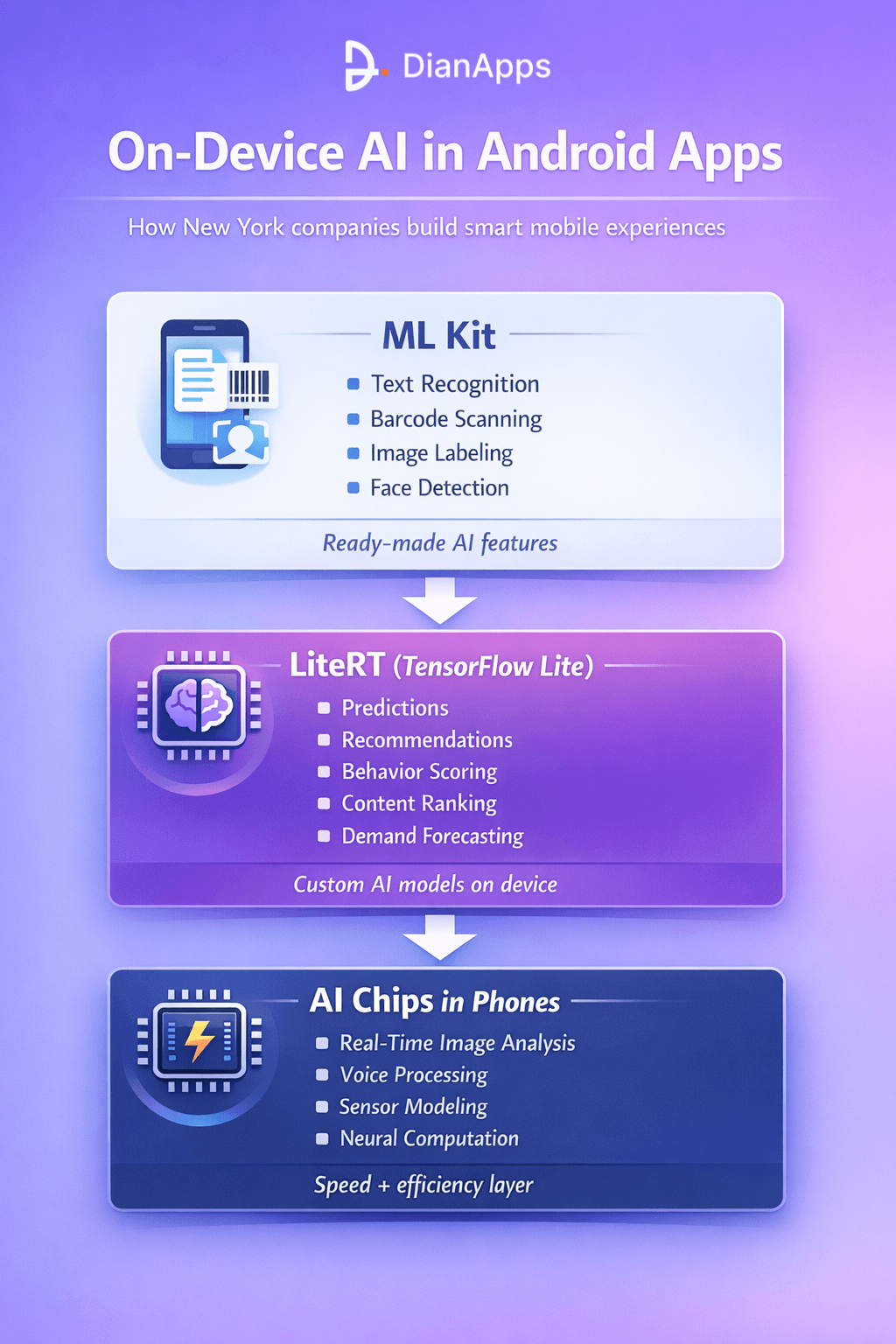
Most development teams working in android app development in New York rely on three major layers.
ML Kit for Ready-Made Features
ML Kit provides prebuilt AI capabilities such as:
- text recognition
- barcode scanning
- image labeling
- face detection
It’s widely used when companies want fast implementation with proven performance.
This works well for many everyday AI features.
LiteRT (TensorFlow Lite) for Custom Models
When businesses need unique intelligence, they use LiteRT.
This allows developers to run their own machine learning models directly on devices.
Common use cases include:
- predictive analytics
- recommendation engines
- behavior scoring
- content ranking
- demand forecasting
This is where serious on-device app development happens.
Hardware Acceleration
Modern Android phones include AI-optimized chips.
These handle:
- neural computations
- real-time image analysis
- voice processing
- sensor data modeling
This reduces power usage while increasing speed. As hardware improves each year, on-device AI capabilities continue expanding.
On-Device AI vs Cloud AI: A Practical View
When businesses think about adding intelligence to mobile apps, the question is rarely “Which is better?” The real question is, “Which approach fits this feature?”
Both on-device AI and cloud AI solve different problems. In modern on-device app development, most teams use a hybrid structure because each method has distinct strengths.
On-device AI focuses on speed, privacy, and independence from network conditions. Cloud AI focuses on scale, large model processing, and centralized intelligence.
Here is a more detailed comparison:
| Factor | On-Device AI | Cloud-AI |
| Processing Location | Runs directly on the user’s smartphone | Runs on remote servers or data centers |
| Speed & Latency | Extremely fast because no network round-trip is required | Depends on internet speed and server response time |
| Offline Functionality | Fully functional without internet access | Typically requires stable connectivity |
| Data Privacy | Sensitive raw data can remain on the device | Data is transmitted to servers for processing |
| Infrastructure Cost | Reduces long term server costs | Can become expensive at scale due to compute usage |
| Model Size | Optimized, lightweight models | Can support very large and complex models |
| Real-Time Interactions | Ideal for instant decisions and camera-based features | Better suited for batch processing and large datasets |
| Device Dependency | Performance varies by device capability | Performance is mostly server-controlled |
| Updates & Maintenance | Requires app or model updates on user devices | Model updates can be deployed centrally |
| Battery Usage | Needs optimization to avoid draining the battery | Minimal device impact, but higher cloud energy usage |
| Scalability | Scales naturally per device | Requires server scaling infrastructure |
When On-Device AI Makes More Sense
On-device AI is the better choice when:
- The feature requires instant feedback
- Internet connectivity may be unstable
- User privacy is a major concern
- Data sensitivity is high
- The model can be optimized to run efficiently on mobile hardware
For instance, barcode recognition, quick fraud checks, document scanning, and facial detection perform when processed locally.
In different cities like New York, where users expect reliable and fast performance even in subways or crowded areas, this approach improves daily usability.
When Cloud AI Is More Practical
Cloud AI becomes necessary when:
- The model is too large to run efficiently on a smartphone
- Massive datasets must be analyzed
- Cross-user pattern recognition is required
- Heavy training processes are involved
- Continuous centralized learning is needed
Advanced predictive analytics and large-scale recommendation engines frequently rely on server-side intelligence.
Why Most Android Apps Use a Hybrid Approach
The most practical solution in modern android app development in New York is not choosing one over the other. It is combining both intelligently.
A common structure looks like this:
- Immediate decisions happen on the device.
- Aggregated or anonymized insights sync to the cloud.
- Larger analytics and training processes occur server-side.
- Updated lightweight models are pushed back to the device.
This structure gives users:
- Instant responsiveness
- Offline reliability
- Stronger privacy confidence
At the same time, businesses retain:
- Centralized data insights
- Scalable analytics
- Advanced machine learning capabilities
Why On-Device AI Is Becoming the Standard for Mobile Apps
Today’s mobile customers want quickness, reliability, and data management. Apps that seem slow load data continually, or rely entirely on internet connectivity rapidly grow unpopular. By transferring intelligence straight into the cell phone, where actions take place swiftly and securely, on-device AI meets these expectations.
This is why more companies are building their apps around local processing.
Instant performance without network delays
Because that there’s no need to transfer data to databases and wait for a response, features like scanning, suggestions, and smart search react instantaneously.
Improved privacy through design
Images, voice responses, and private behavior are manifestations of sensitive data that can remain on the device, lowering exposure and boosting user confidence.
Reliable offline encounters
For real-world use, on-device AI makes it possible to perform essential features to function even in places with spotty or nonexistent internet.
Lower long-term infrastructure costs
By shifting inference away from cloud servers, companies reduce compute expenses as their user base grows.
Better battery and hardware efficiency over time
Modern mobile processors are built to handle AI workloads efficiently, making local processing faster and less power-hungry each year.
Scalability built into every device
Each smartphone becomes its own processing unit, eliminating the need for constant server scaling during high traffic periods.
Improved user satisfaction and retention
Faster, smoother apps naturally feel more premium, leading to better engagement and stronger app store reviews.
Together, these advantages are turning on-device AI from an optional feature into a core design principle for modern mobile app development.
Recommended Read: How to Choose an Android App Development Company in New York?
The Future of On-Device App Development
On-device app development has now become a foundation of modern mobile experiences, as users expect stronger privacy, reliable offline functionality, and faster performance. Nowadays, mobile software and hardware are enhancing every year, which leads to a shift in more intelligence directly onto smartphones instead of cloud servers.
- Strong AI-focused processors that are capable of handling complicated tasks are growing more and more prevalent on mobile devices.
- These days, smarter and bigger versions are optimized to work perfectly on phones.
- Building user trust and keeping sensitive data local are the two advantages of privacy-first design.
- The quantity of offline functionality in retail, business, productivity, and travel applications keeps growing.
- Cloud-based analytics and on-device speed are utilized in hybrid systems to offer deeper insights.
Together, all these trends are making efforts to build a future where secure, fast, and responsive apps become the standard rather than the exception.
Final Words
The building and user experience of Android apps are already being altered by on-device AI. Better privacy, faster replies, and capabilities that work without internet connectivity are rapidly moving from extras to standard features.
Designing apps based on this approach has become a wise long-term choice for businesses looking to maintain their market share. It is moving from an important reliance on the cloud to mobile experiences that are lighter, quicker, and more secure.
So working with a skilled mobile app development company in US makes it very easy to turn these ideas into real products that really perform well in everyday conditions. As mobile technology keeps on growing or improving, apps powered by on-device intelligence will continue setting the standard for user experience.
Frequently Asked Questions
 0 comments










Leave a Comment
Your email address will not be published. Required fields are marked *