

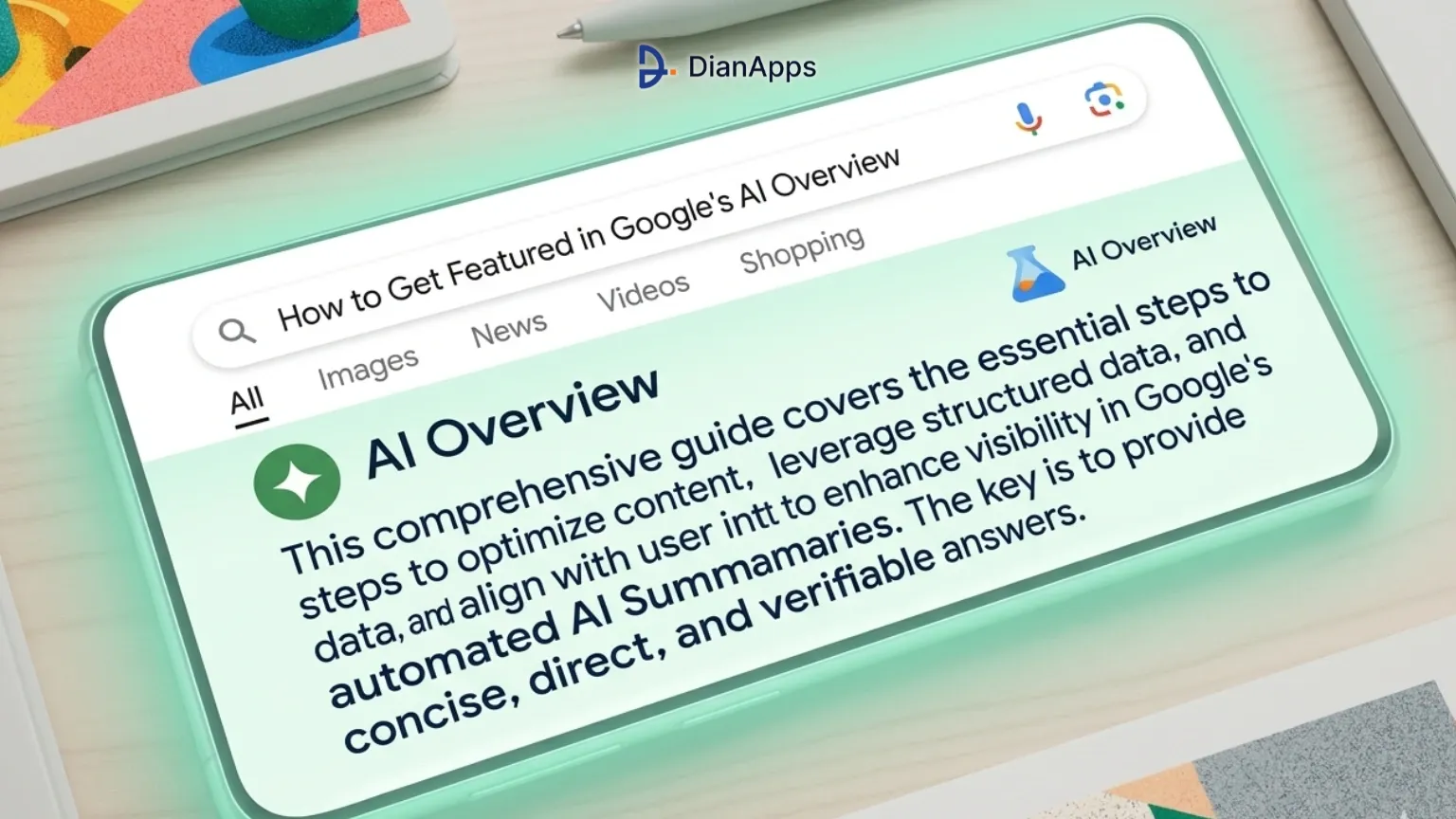
You have probably noticed it. You search for something on Google and, before you even see any websites, there is a big block of text at the top that answers your question directly. That is a Google AI Overview.
And here is the problem. That block pushes all the normal search results way down the page. If your website is not mentioned inside that AI Overview, most people will never see your link at all.
The good news? You do not need to be a famous website to get cited in an AI Overview. In fact, almost half of the websites Google cites in AI Overviews do not even rank in the top 10 search results. That means a smaller, newer website can still show up, as long as you know what Google is looking for.
At DianApps, we have been tracking this shift for over a year. We already covered what Google's new AI Mode means for digital marketing and how brands need to evolve their content strategy. This guide explains exactly how to do that, in plain language. No technical jargon. No complicated formulas. Just practical steps you can start using today.
| Quick Summary: Google AI Overviews now appear in more than 60% of searches. If your content gets picked, you will get 35% more visitors from search, even if you are not ranking number one. This guide walks you through 7 simple things you can do to improve your chances. |
First, What Exactly Is Going On With Google?
Google has changed the way it shows search results. Instead of just listing 10 websites, it now reads through lots of pages and writes its own answer at the very top. This answer is called an AI Overview.
These AI Overviews are getting more and more common. Right now, they appear on nearly half of all Google searches. In some areas like healthcare, education, and technology, they show up on almost every single search.
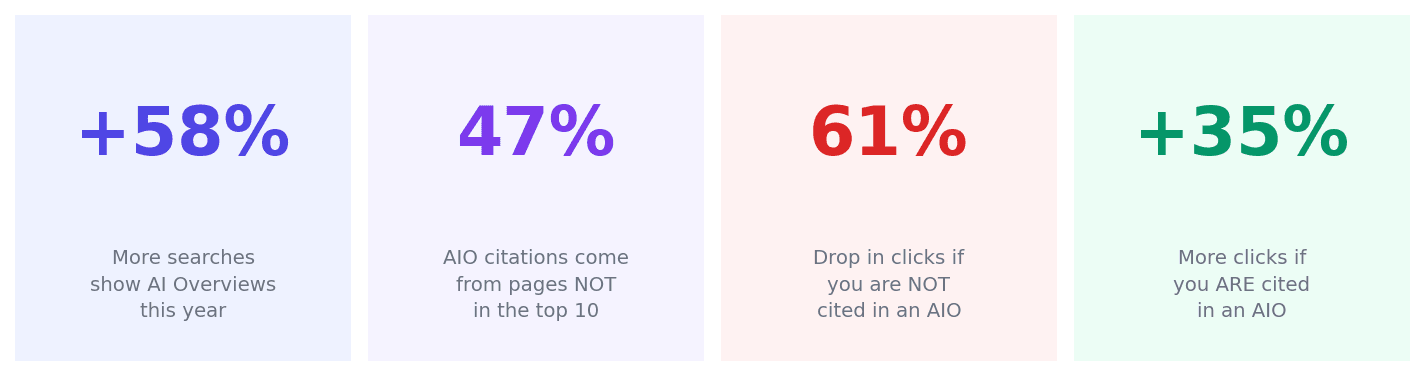
What the numbers tell us. Sources: BrightEdge 2026, Seer Interactive 2025
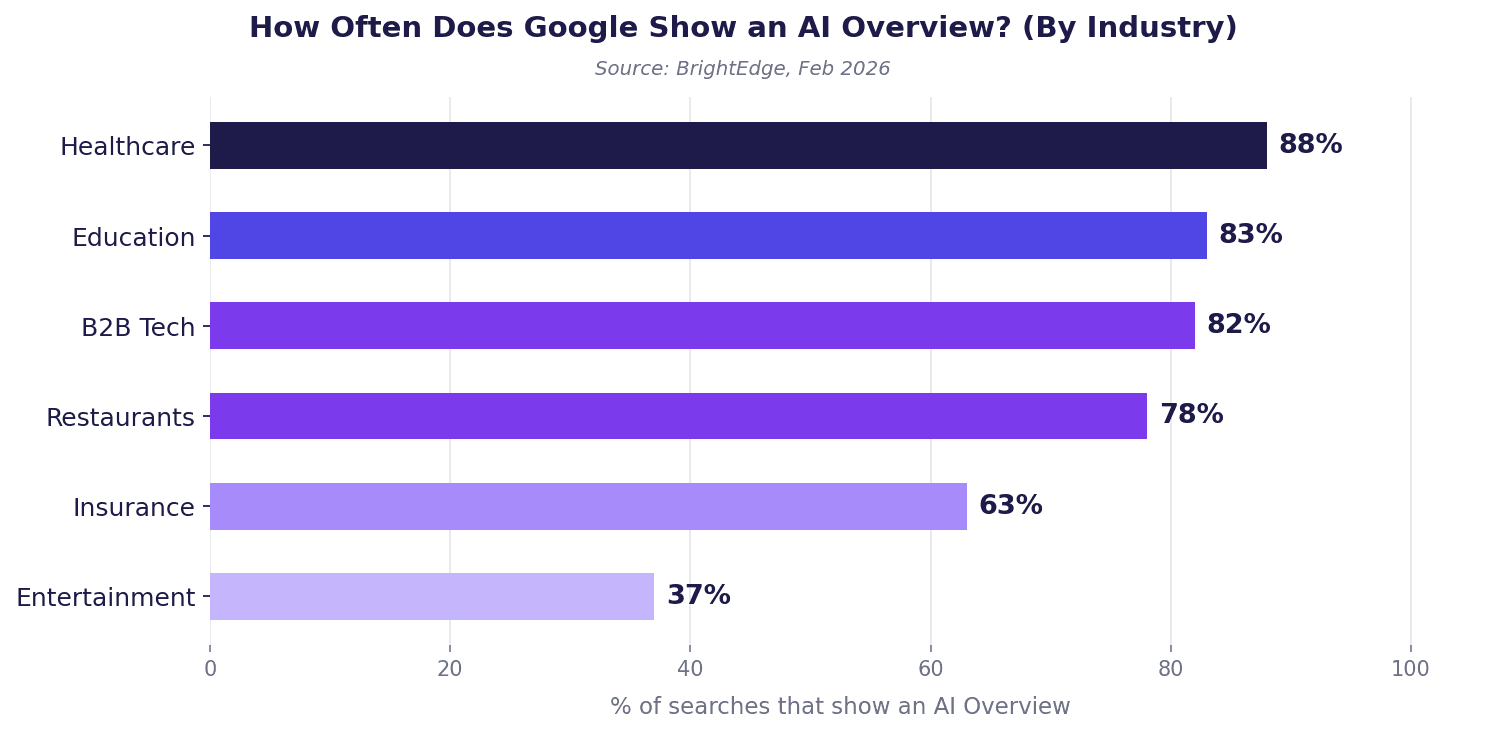
How often AI Overviews appear, by industry. Source: BrightEdge, Feb 2026
Think about what this means for your website. If someone searches for something and Google shows an AI Overview, that big block sits right at the top. People read it, get their answer, and often do not scroll down at all.
If your website is mentioned inside that AI Overview, you are in a great position. If it is not, you are practically invisible, even if you worked hard to get your pages ranking well.
| Worth knowing: Here is something surprising: Google does not only cite pages that rank number one. Around 47% of the websites it mentions in AI Overviews do not even appear on the first page of search results. So this is a real opportunity, even for newer or smaller sites. |
Step 1: Write So That Every Section Answers One Clear Question
This is the single most important thing you can do. Google's AI reads your page and looks for sections that answer a specific question clearly and completely, without the reader needing to go anywhere else to understand it.
Think about it from Google's perspective. It wants to pull out a neat, helpful answer to show the user. If your section is easy to understand on its own, Google can use it. If it is vague or requires reading five other sections first, Google will skip it.
How to do this:
- Start every section with a direct answer. Do not build up to it. Say it straight away.
- Keep each section focused on just one idea or question. Do not mix topics.
- After you have written a section, read it on its own. If it makes sense without reading the rest of the article, you have done it right. If it is confusing without the surrounding context, rewrite it.
- Use simple language and explain terms when you use them for the first time.
At DianApps, this is one of the first things we check when improving a client's content. Once we restructure their pages this way, results usually start to show within a couple of months.
| DianApps tip: Read through your most important blog posts or service pages. For each section, ask yourself: if someone only read this part, would they understand it? If the answer is no, that section needs a clearer opening sentence. |
Step 2: Add a FAQ Section to Your Pages
Pages that have a properly set up FAQ section are 60% more likely to appear in Google AI Overviews. That is a big jump, and it is one of the easiest improvements you can make.
Why does this work? Because Google AI Overviews are basically answers to questions. When your page already has a list of questions and answers, Google can easily pull from it. You are doing half the work for it.
What makes a good FAQ section:
- Use real questions your customers or readers actually ask, not made-up ones.
- Keep each answer short and clear. Two to four sentences is usually enough.
- Each answer should make sense on its own, without needing to read the question above it.
- Put the most important or most common question first.
There is also something called FAQ schema, which is a small piece of code you add to your website that tells Google your page has a Q&A section. Pages with this code are picked up much more easily. Google's own Search Central documentation explains how it works if you want to read more. If you are not sure how to add it, the team at DianApps can take care of it for you.
Step 3: Use Images, Videos, and Visuals. Not Just Text
Here is something a lot of people do not realise. Pages that mix different types of content, such as text, images, and videos, are far more likely to be cited by Google than pages that are just walls of text.
Pages with a mix of content types are over 150% more likely to show up in AI Overviews. That is not a small difference. It is the kind of thing that can change whether your page gets seen or not.
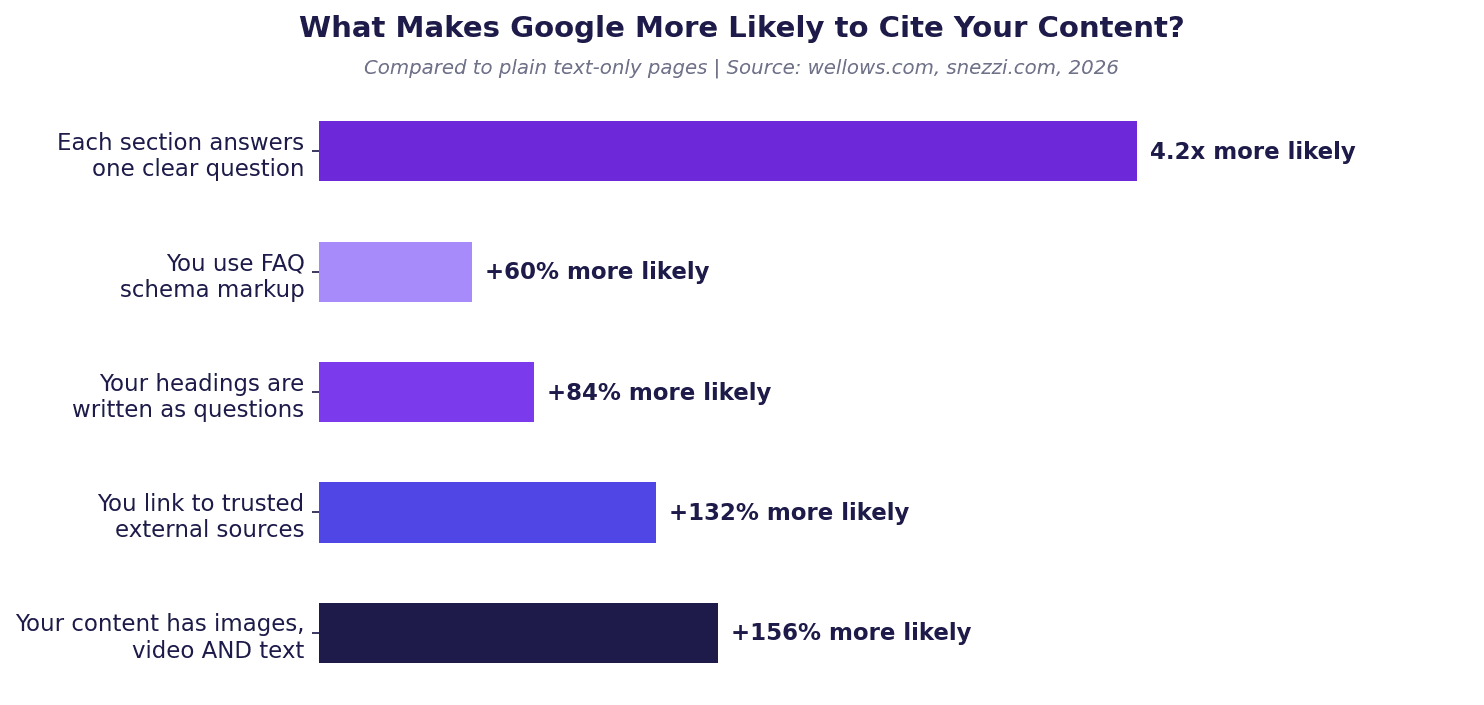
Things that make Google more likely to cite your page. Source: wellows.com, snezzi.com, 2026
Why does this matter? Google's AI is trained to give users rich, helpful answers. When your page already looks like a well-rounded resource, with visuals to support the text, it fits exactly what Google wants to share.
Simple ways to add visuals to your content:
- Add a relevant photo or graphic to every blog post or article.
- Use a simple chart or table when you are comparing numbers or options.
- If you have a process or a set of steps, consider turning it into a visual diagram.
- Videos do not need to be professional. Even a short explainer recorded on your phone helps.
If you want ideas on which tools make it easy to create visuals without a designer, we put together a list of AI marketing tools worth trying that covers some good options.
Step 4: Put Your Best Information at the Top
Here is a pattern that Google's AI follows: it pays much more attention to the beginning of your page than the end. Research shows that nearly half of all the content Google cites from websites comes from the first third of the page.
So if you have been saving your most important points for the conclusion, stop doing that. Say the most valuable thing first, and then back it up with details.
A simple structure that works well:
- Start with the answer or main point in one or two sentences.
- Give one piece of evidence or a real example to support it.
- End with a clear, practical takeaway the reader can act on.
This works for individual sections too, not just whole articles. Each heading should be followed immediately by the most important sentence, not a long introduction.
Also, try writing your headings as questions. Instead of 'Content Strategy', write 'What is the best content strategy for small businesses?' Google is much more likely to pick up headings that match how people actually search. Search Engine Journal has a good overview of how question-based content performs in AI search if you want to go deeper on this.
Step 5: Show Google That You Know What You Are Talking About
Google has a concept called E-E-A-T, which stands for Experience, Expertise, Authority, and Trust. In simple terms, Google wants to know that the person or company behind the content actually knows their stuff. And it checks this not just on your website, but across the whole internet.
If your brand is mentioned in other places online, such as YouTube videos, other websites, LinkedIn, or industry blogs, Google sees that as a trust signal. The more places you show up as a credible voice, the more likely Google is to cite your content.
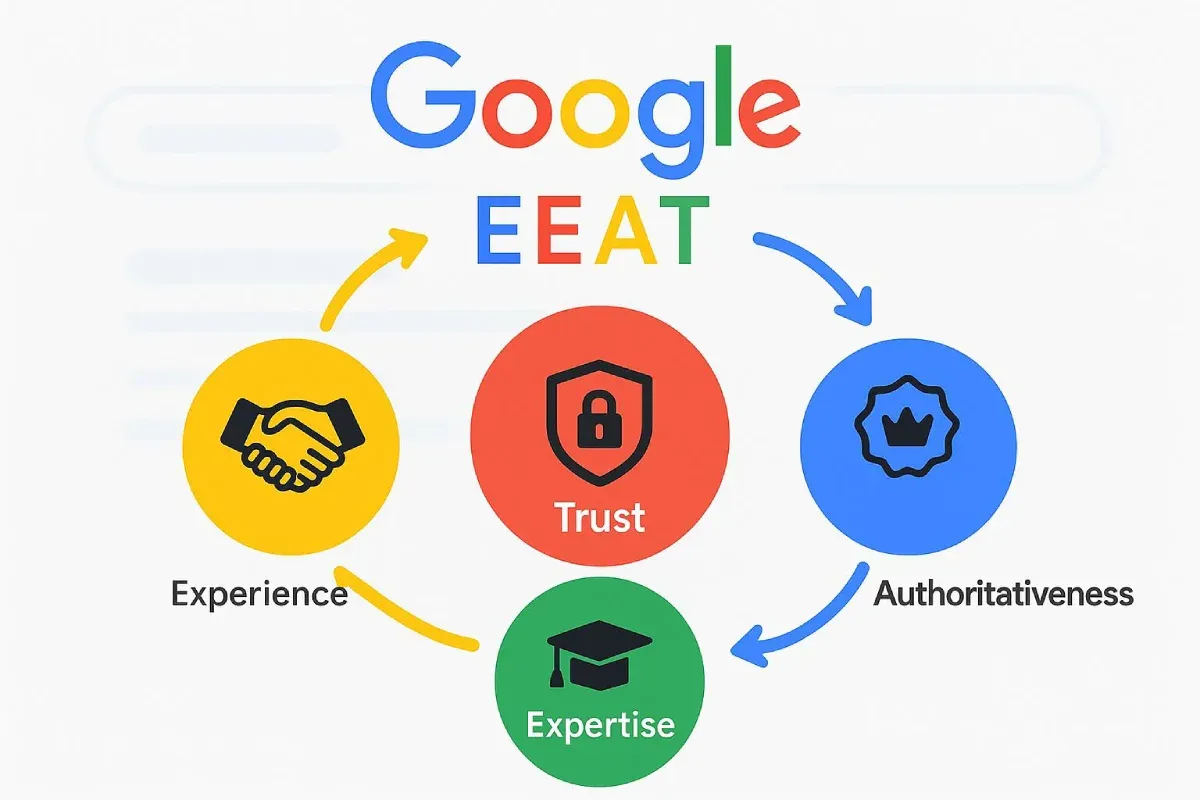
Practical things you can do right now:
- Add a proper author bio to your articles. Include the author's real name and a bit of background.
- Link your author bio to a LinkedIn profile or a personal website page.
- When you mention a fact or statistic, link to the original source. This tells Google your content is properly researched.
- Write in first person sometimes. Phrases like 'in our experience' or 'when we tested this' signal real-world knowledge.
- Try to get your brand mentioned on other websites, even in small ways.
| Worth knowing: Google does not just read your website. It looks at your presence across the whole web. A mention on YouTube or LinkedIn can actually help your website content get cited in AI Overviews. Cross-web presence matters more than most people realise. |
Step 6: Write for the Way People Actually Search
The way people type searches into Google has changed. People are now typing full questions, things like 'what is the best way to rank in Google AI Overviews' rather than just 'AI Overview ranking tips'.
Longer, question-style searches are seven times more likely to trigger an AI Overview. That is a massive difference. So when you are planning what to write about, look for those kinds of questions first.
Where to find good questions to write about:
- Look at the 'People Also Ask' box that appears in Google search results.
- Check your customer support emails or chat logs. What do people actually ask you?
- Use free tools like AnswerThePublic to find common questions around your topic area.
- Look at the comments on your blog posts or social media. Those are real questions from real people.
Once you have a list of questions, write a dedicated section or article answering each one clearly. This is exactly the kind of content Google pulls from. For more on how this fits into a broader SEO strategy, take a look at our post on 5 ways SEO can improve your digital marketing.
Step 7: Track Whether You Get Cited, Not Just Where You Rank
Most website owners track their Google rankings. That is still useful, but it does not tell the full story anymore. What really matters now is whether your content is being cited inside AI Overviews.
Here is why this matters so much:
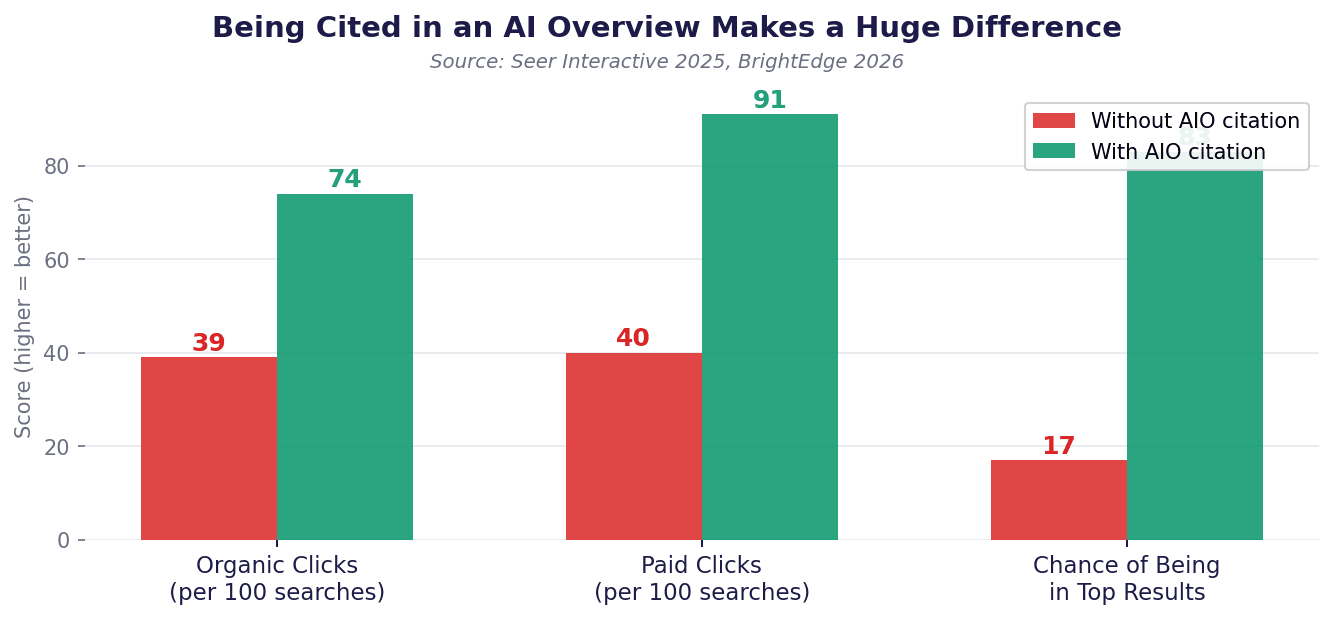
The difference getting cited makes. Source: Seer Interactive 2025, BrightEdge 2026
If you are not cited in an AI Overview, your clicks can drop by more than 60%, even if you rank well. But if you are cited, you can actually get more clicks than before. Being inside the AI Overview puts you at the very top of the page, which is more valuable than any ranking.
What to start tracking:
- Search for your target keywords manually in Google. Do you see an AI Overview? Is your website mentioned in it?
- Check which of your pages are getting traffic from Google. If a page is doing well, search for the topic and see if it appears in the AI Overview.
- Look at what your competitors are doing. Are their pages being cited? What are those pages doing differently?
| DianApps tip: One of the simplest things you can do today: open a private browser window, search for the topic your most important page covers, and see if an AI Overview appears. If it does, check whether your website is in it. If it is not, that page is the first one to work on. |
What to Do Next
AI Overviews are not going away. They are going to keep growing, and they are already changing how most people find information online. The websites that adapt early will have a clear advantage.
The good news is that nothing in this guide is beyond reach. You do not need a massive budget or a team of developers. You just need to think carefully about how your content is written and make sure it is genuinely useful to the people reading it.
Start with the basics. Pick your most important page and go through it with the steps in this guide. Write clearly. Answer questions directly. Add some visuals. Put your best points at the top.
If your content is genuinely helpful and clearly written, Google is much more likely to share it with the world.
A quick recap of the 7 steps:
- Write so that every section answers one clear question on its own.
- Add a proper FAQ section to your important pages.
- Use images, charts, and videos alongside your text.
- Put your most important information at the top of each page and section.
- Show Google you are a trusted source, on your site and across the web.
- Write about the questions your readers actually ask.
- Track whether your content appears in AI Overviews, not just where it ranks.
If you want help putting these steps into practice, visit DianApps. We help businesses create content that gets found, gets read, and gets results.









Leave a Comment
Your email address will not be published. Required fields are marked *